
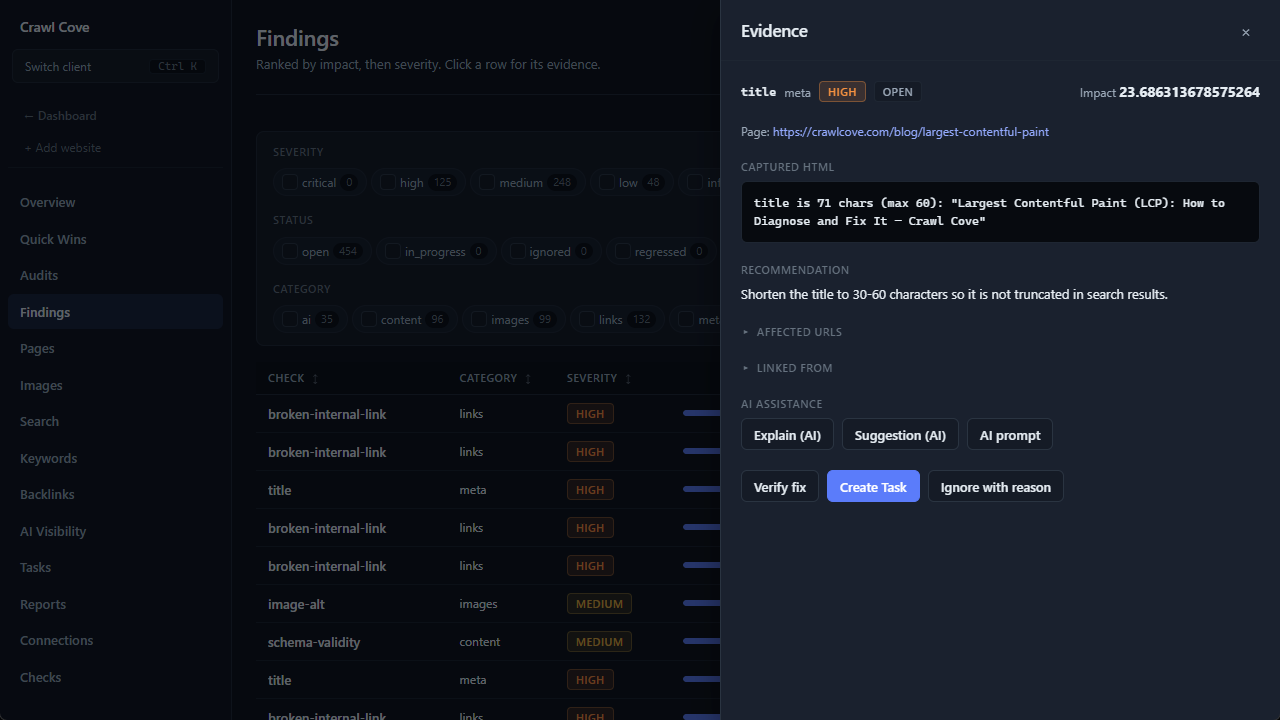
A ranked list of findings tells you what and how much. The evidence drawer tells you why, where, and what to do about it, without leaving the Findings page. Click any finding row in the Findings Explorer and the drawer slides in with the full case file for that issue.
This is where an audit stops being a report and starts being work you can hand to someone. This guide walks the drawer top to bottom.
What's in the drawer
Evidence snippet (rendered-vs-raw diff)
At the top is the offending HTML itself, syntax-highlighted so the problem is easy to spot. Where it's relevant, the snippet shows a rendered-vs-raw diff: the HTML as the raw response served it next to the HTML after JavaScript ran.
That diff is how Crawl Cove proves a JS-dependency issue rather than guessing at it: if critical content or schema only appears in the rendered column, you can see that it wasn't in the source. No "I think this is loaded by JavaScript". The two columns are the evidence.
Affected URL list
Every URL the finding touches, listed out. One finding often covers many pages (a duplicate title spans every page that shares it), and this is where you see the full blast radius, along with the count that feeds the impact score.
"Linked from" referrers
A panel showing which internal pages link to the affected URL. This turns an abstract issue into a concrete fix list: when a page is orphaned, redirected, or broken, you immediately know which templates or posts to edit, instead of hunting through the site for the offending links.
Plain-English explanation and suggested fix
A readable account of what the issue is and how to resolve it. If you've configured an LLM backend, this is drafted by the model; if you haven't, it falls back to a deterministic template. Either way the text is schema-validated before it's shown, and any output that fails validation quietly reverts to the template. The panel is never empty and never garbled.
Note
The AI here is interpretation only. It explains a finding and drafts a fix in plainer language. It can never create, remove, or rescore a finding. Every issue in the drawer came from a deterministic check; the model just narrates it. Turn the LLM off entirely and the drawer still works, using templates.
"Suggestion (AI)" on demand
If you'd rather generate the AI explanation only when you want it, the "Suggestion (AI)" action drafts one on demand for that specific finding. Useful when you're working with the LLM set conservatively, or when you want a fresh plain-English write-up to paste into a client message for a particular issue.
Effort estimate
A quick read on how much work the fix is. Combined with impact score, this is the classic prioritisation grid in miniature: high impact, low effort issues are the ones to do this afternoon.
Acting on a finding
The drawer isn't just for reading. It's where a finding becomes action.
Create Task
The Create Task button pushes the finding straight to the client Tasks board, carrying its evidence and effort estimate with it. The card lands in Backlog with everything the person doing the work needs (the offending HTML, the affected URLs, the suggested fix) already attached. No copy-pasting an issue into a separate tracker.
Because the task keeps its link back to the finding, the board can later verify the fix automatically: the next crawl (or an on-demand Verify) re-runs the same deterministic check and moves the card to Verified Fixed or bounces it back. That loop is the whole reason to route findings through tasks instead of a spreadsheet.
Ignore with reason
Not every finding applies to every client. The ignore-with-reason action hides a finding from the active queue but records why you dismissed it. This keeps the findings list honest: an ignored issue isn't silently gone, it's documented as a deliberate decision you can defend later: "we ignored this because the client's faceted URLs are intentionally noindexed," not a mysterious gap.
Tip
Ignore-with-reason and the Check Registry solve different problems. Ignore one finding when this instance doesn't matter; disable or retune a check when this kind of finding doesn't apply to the client at all.
Why agencies care
The evidence drawer is what lets you act on an audit with confidence. The HTML diff and referrer panel mean you're never guessing at a cause; the schema-validated explanation means even your AI-assisted copy is grounded in a deterministic finding; and Create Task means the fix is tracked and verifiable from the moment you spot it. You spend your time fixing, not assembling context.
Next
- The Tasks board and the self-verifying workflow: where Create Task sends the finding, and how the fix gets verified.
- Configuring the LLM backend: set up Ollama or Anthropic to power the plain-English explanations (or leave it off).
Want to see the evidence behind every issue on a real client site? See plans and get Crawl Cove →