
A thorough crawl of a real client site routinely produces hundreds of findings. Sorting them by severity alone is honest but not useful: you end up with forty "high" issues and no way to tell the one on a page worth thirty thousand monthly impressions from the one on a forgotten tag archive nobody visits.
Crawl Cove's impact score fixes that. It ranks each finding by the real Search Console traffic it touches, so "412 findings" becomes "fix these nine first." This guide explains exactly how the number is built, why you can trust it in front of a client, and how to work the Findings Explorer with it.
Note
What you'll need: a completed audit, and Google Search Console connected for the client. Without GSC, impact scores read 0 and findings fall back to severity ranking. See Connecting Google Search Console.
How the score is calculated
Impact is a single number per finding, computed deterministically:
impact = severity weight × log1p(GSC impressions on the affected URLs)
Two ingredients, multiplied:
- Severity weight: how serious the issue is in principle. A critical
status-codefailure carries far more weight than a low-severityredirect-chainnote. log1p(impressions): the real Search Console impressions on the URLs that finding actually affects.log1pis just "the logarithm of (impressions + 1)."
The log matters. Traffic is wildly uneven: your homepage might pull a hundred times the impressions of a deep blog post, and raw multiplication would let one mega-page drown out everything else. Taking the logarithm compresses that range, so a page with 100,000 impressions scores meaningfully higher than one with 1,000, but not a hundred times higher. The result is a ranking that respects traffic without being a slave to it.
Tip
The plain-English version to tell a client: "We sorted every issue by how serious it is and how much real Google traffic the affected pages get, so the top of the list is genuinely the best place to spend the next hour."
Why this beats sorting by severity
Severity answers "how bad is this kind of issue?" Impact answers "how much does fixing this specific instance matter for this client?" Those are different questions, and only the second one builds a to-do list.
A missing title tag is a high-severity issue everywhere. But a missing title on a page with 28,000 monthly impressions is a different morning's work from a missing title on a page with twelve. Impact score puts the first one near the top and lets the second one wait, without you reading every row to decide.
Because the inputs are a coded severity weight and real GSC numbers, the ranking is deterministic, never AI-guessed. The same audit always produces the same order. No model is in the loop ranking your work, so when a client asks "why is this number one?" you can show the arithmetic.
Working the Findings Explorer with impact
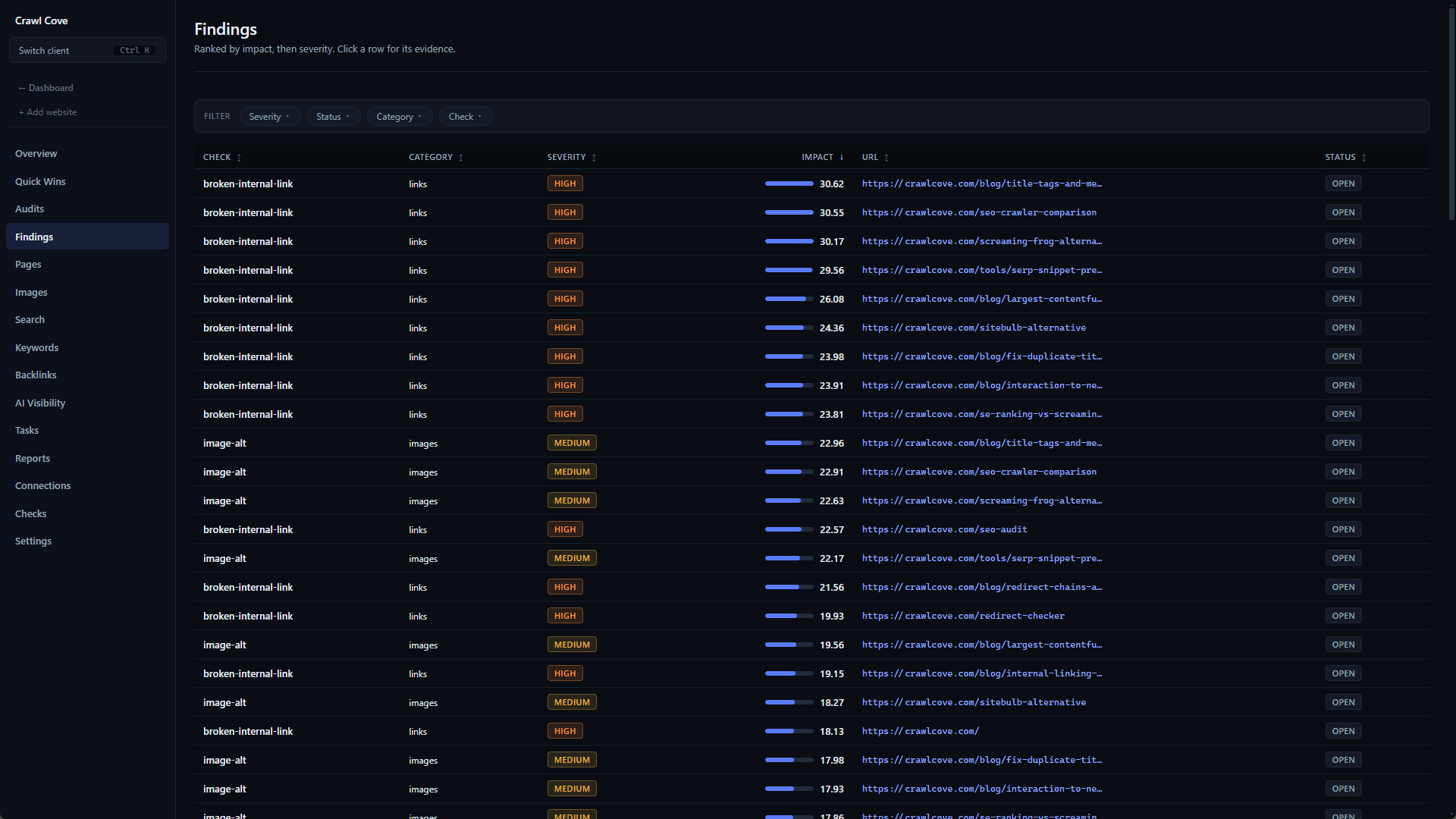
On the client Findings page, the table columns are: check, category, severity, impact score, affected-URL count, and status.
The default sort ranks by impact (once GSC is connected) and breaks ties by severity. So even before you touch a control, the top rows are the highest-traffic serious problems. Two findings with the same impact? The more severe one wins the tie.
A practical loop for a fresh audit:
- Open Findings. It's already impact-sorted.
- Read down the top ten or fifteen rows. These are your week.
- Open a row to see the evidence drawer: the affected URLs, the offending HTML, and an effort estimate.
- Create Task on the ones worth doing now; ignore-with-reason on the ones that genuinely don't apply to this client.
That converts a daunting wall of findings into a short, defensible action plan in a few minutes.
When impact scores are all zero
If every impact score reads 0, GSC isn't connected for that client. Impact needs impressions data, and with none the multiplier collapses.
This isn't a failure; the app degrades honestly. With no GSC, findings rank by severity instead, so your most serious issues still float to the top; you just lose the traffic-weighting that distinguishes two equally-severe issues. Connecting Search Console makes findings re-rank by impact immediately after the first sync, no re-crawl required.
Note
Impact is a prioritisation aid, not a finding. It never creates, removes, or rescores an issue. It only orders the issues the deterministic checks already produced. Turning GSC on or off changes the order, never the list.
Why agencies care
Retainer time is finite. The value of impact scoring is that it spends your hours where they move the client's actual numbers, and gives you a one-line justification for every choice. "We prioritised by severity and real Search Console traffic" is a sentence that survives a sceptical client call, because the ranking is reproducible and the data is the client's own.
Next
- Connecting Google Search Console: the one integration that turns severity sorting into impact sorting.
- Inside the evidence drawer: open any ranked finding to see its evidence, effort, and the Create Task button.
Ready to rank a real client's findings by real traffic? See plans and get Crawl Cove →