
Every finding in Crawl Cove comes from a coded check — a deterministic rule with a stable id and version, never an AI guess. The Check Registry is where you see all of those rules in one place and tune them per client. It's an advanced page, but it earns its keep in two moments: when a prospect asks "what exactly do you test?", and when one client's site needs different rules from another's.
The app ships 35 deterministic checks across nine categories — HTTP, meta tags, content, links, security, images, an auto-detected WordPress pack, and AI-readiness checks. The Registry is your control panel over all of them.
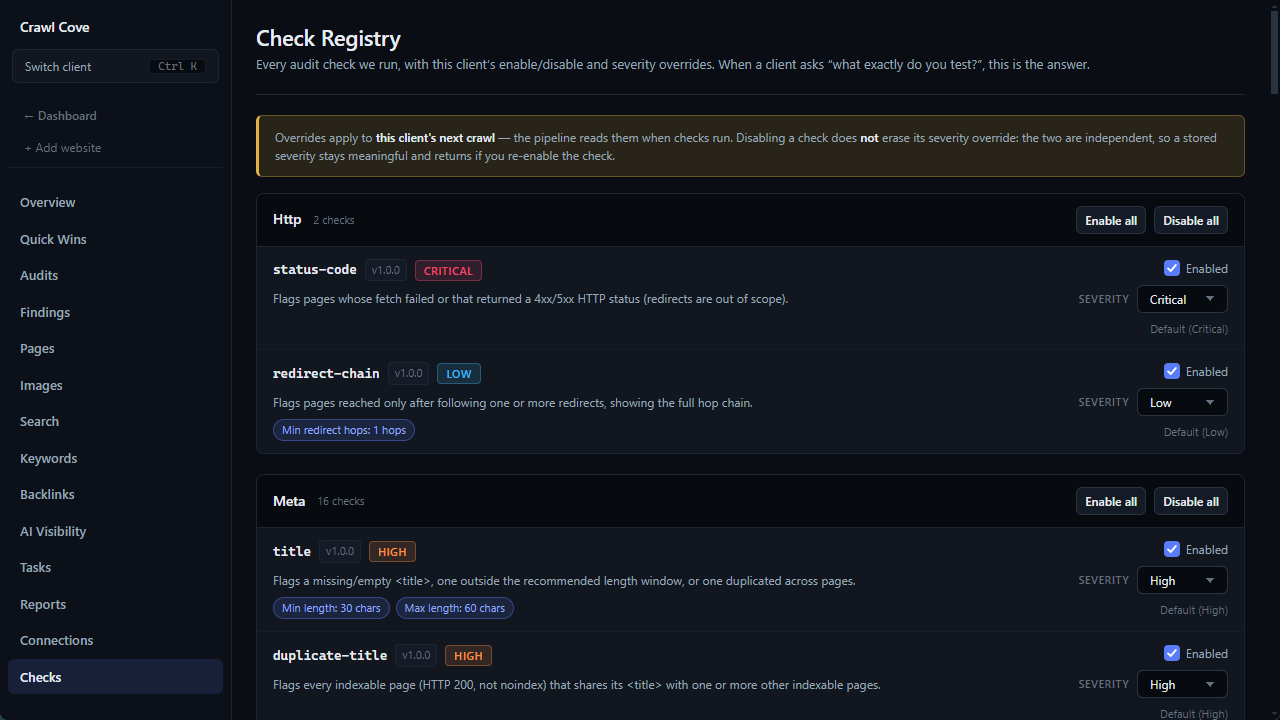
What the Checks page shows
Open a client and go to the Checks page. For every check you see:
- ID — a stable identifier (e.g.
title,thin-content,ai-extractability). - Version — a semantic version that increments when the check is improved.
- Category — which of the nine groups it belongs to.
- Default severity — critical / high / medium / low / info, as the check ships.
- Thresholds — the tunable parameters, where the check has them (e.g. the title-length range, the thin-content word floor, the minimum inbound-link count).
Enable or disable checks per client
Not every rule fits every site. A faceted e-commerce catalogue plays by different rules than a blog, and a client may simply not care about a particular issue. So you can enable or disable any check per client:
- Individually — flip one check off for this client.
- In bulk — flip many checks at once without losing your severity overrides, so you can set up a new client's profile in a few clicks instead of one toggle at a time.
Disabling is per client, so turning off a check for an e-commerce site leaves it on for everyone else.
Override severity per client
You can also override a check's severity for a specific client — promote something to high because it matters to this site, or quiet it to low because it doesn't. When you want to go back to the shipped behaviour, clear the override and the check reverts to its in-code default. Nothing is permanently lost; the default is always one click away.
Tip
Overrides are respected by the audit pipeline on the next crawl — not retroactively rewritten into past runs. Tune the checks, then run a fresh audit to see your profile take effect. That ordering is deliberate: it keeps every historical run a faithful record of the rules that were in force when it ran.
Why version pinning keeps deltas honest
Each check carries a version. When you improve a check later, the version bumps — so Crawl Cove can tell the difference between "this finding is new because the site changed" and "this finding is new because the rule changed." That's what keeps the run-to-run delta chips (▲ new, ✓ fixed, ● persisting) trustworthy. Without version pinning, sharpening a check would silently inflate next month's "new issues" and undermine the very thing the deltas are for — proving a fix worked.
Custom checks
A slot exists for custom checks — your own rules in the Registry. It's labelled "coming soon" in the current build.
Why this matters
When a client asks what you actually test, you don't hand-wave — you open the Check Registry and show them 35 named, versioned rules, each with a severity and a threshold, all running deterministically against their site. Per-client overrides let you say yes to the e-commerce client's special-casing without compromising anyone else's audit. It's the page that turns "trust me, I'm thorough" into "here's the exact list."
For the full catalogue — every id, what it detects, its default severity, and its tunable parameters — see The complete audit-check reference.
Next
- The complete audit-check reference — all 35 checks and their thresholds, in detail.
- Running your first audit — run a crawl to see your tuned profile take effect.