
WordPress plugin
Crawl, approve, push it live.
Crawl Cove Connector is a free WordPress plugin that closes the loop after a crawl. Instead of exporting a spreadsheet of title and description fixes and editing each post by hand, it applies the fixes you approved in the desktop app straight to Yoast, Rank Math, SEOPress or AIOSEO.
Free · GPL-licensed · not yet on wordpress.org, install from GitHub
How it works
-
1. Connect
Install the plugin, create a WordPress Application Password for your user, then paste your site URL and that password into the site's profile in the desktop app. No API keys stored by the plugin, and access can be revoked any time from your WordPress profile.
-
2. Crawl and review
Run a crawl as normal. Title and meta description fixes show up alongside everything else Crawl Cove finds, and dry-run mode shows exactly what would change before anything is written.
-
3. Push and, if needed, revert
Approve the fixes you want and push them. Every change is logged with its previous value under Tools → Crawl Cove, and any single change reverts with one click, from WordPress or from the app.
Works with the SEO plugin you already use
The connector writes each plugin's own native fields, nothing is duplicated or overridden at render time, and it detects which one you have automatically.
Yoast SEO
Writes Yoast's own title and meta description fields, the same ones its metabox saves to.
Rank Math
Writes Rank Math's title and description postmeta directly, so the plugin picks the new values up immediately.
SEOPress
Writes the _seopress_titles_title / _seopress_titles_desc postmeta SEOPress's own admin metabox uses, and deletes it on empty.
AIOSEO
Title and description live in AIOSEO's own database table, not postmeta, and are written through AIOSEO's own Post::savePost() so the rest of a post's AIOSEO settings stay untouched.
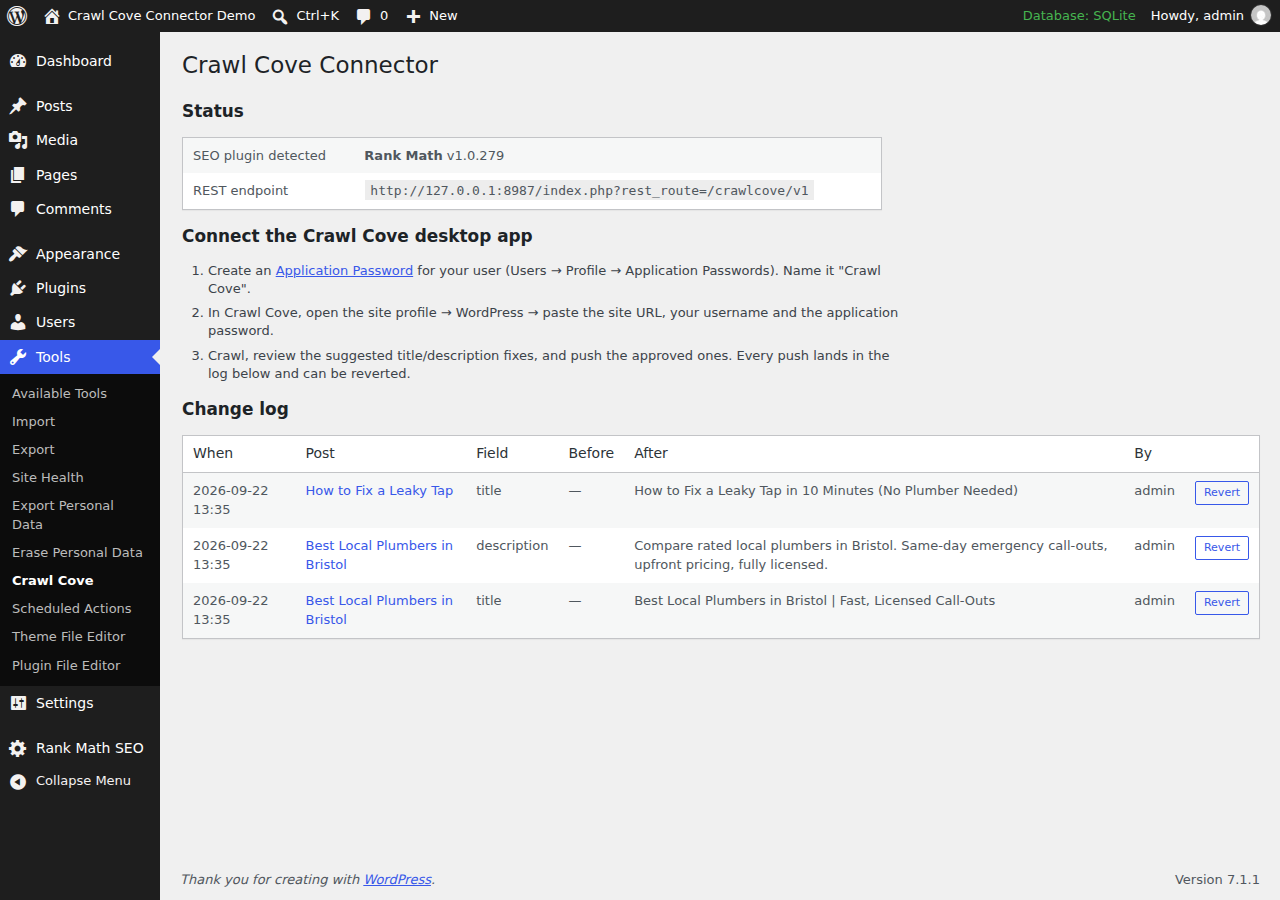
Tools → Crawl Cove on a test site, showing the connection status and change log. Post titles shown are placeholder demo content.
Built to be safe on a live site
- Dry-run mode shows exactly what would change before anything is written.
- Every write is capability-checked, so a connected user can only change posts they are allowed to edit in WordPress.
- Nothing is applied unless you approved it in the crawler first.
- Every change is logged with its previous value and reverts with one click, from WordPress or the app.
- Authentication uses core WordPress Application Passwords over HTTPS: no extra accounts, no API keys stored by the plugin.
- A small, auditable codebase, a few hundred lines, GPL-licensed, no external requests and no tracking.
Note
Frequently asked questions
- Is this the same as installing Crawl Cove?
- No. Crawl Cove is the desktop app that crawls your site and finds the problems; Crawl Cove Connector is a small, separate WordPress plugin that applies the title and description fixes you approve in the app. You need the desktop app to generate fixes and the plugin to push them, and the plugin does nothing without it. Get the desktop app
- Does it work without Yoast, Rank Math, SEOPress or AIOSEO?
- Not yet. The plugin writes the SEO title and description fields those four plugins own, so one of them needs to be active. Support for further SEO plugins is planned, and the plugin's own status screen reports which one it detected on your site.
- Can it change my page content, not just SEO fields?
- No. It writes only the title and meta description fields, only for changes you approved in the crawler, and only for posts the connected WordPress user is allowed to edit. Every touched post is re-saved so your SEO plugin picks the new values up straight away.
- Is it safe to run on a live site?
- Every write is capability-checked, length-capped, validated and logged with its previous value, so reverting is one click from Tools → Crawl Cove or from the desktop app. Dry-run mode shows exactly what would change before anything is written. Authentication is core WordPress Application Passwords over HTTPS, not a stored API key.
- Is it on the WordPress.org plugin directory yet?
- Not yet. The repo is public on GitHub and the code is ready, but the wordpress.org submission is still pending, so for now install it from the GitHub repo's releases. View the GitHub repo
- What does it cost?
- Nothing. The plugin is free and GPL-licensed, a few hundred lines with no external requests and no tracking. It needs the Crawl Cove desktop app to generate fixes for it to push.
Stop guessing.
Start fixing.
Crawl Cove runs on your machine, connects to your real ranking data, and tells you exactly what to fix first. No per-feature paywalls, no spreadsheets, no guesswork.
28 days risk-free · No card required