
Key takeaways
- Comparing two crawls answers a specific question, "did this exact issue on this exact URL actually go away", which a fresh crawl on its own cannot answer.
- Screaming Frog added Auto Compare Crawls in version 24 (May 2026); it needs database storage mode and a paid licence, and runs on scheduled or CLI crawls.
- Sitebulb's Audit Comparisons feature is Pro-only, not included on its Lite plan.
- Crawl Cove compares every run to the one before it automatically, with no separate compare step, export or licence tier to unlock.
"We fixed that" and "we can show you it's fixed" are different sentences, and only one of them survives a client asking a follow-up question. The gap between them is a second crawl and a comparison against the first one, and how much work that comparison takes depends entirely on which tool ran the crawl.
This is what comparing two crawls of the same site actually involves, what it costs in the two big desktop crawlers, and why it is worth checking whether your tool does it automatically before you build a manual process around one that doesn't.
What "comparing two crawls" needs to answer
A second crawl on its own tells you the current state of a site. It does not tell you what changed, and "what changed" is the only question that matters after a fix ships. A useful comparison needs to answer three things on the same finding, matched to the same URL: was this here before, is it still here now, and if it's gone, did it actually get fixed or did the page just stop being crawled.
That last one is the trap in a hand-rolled comparison. Diffing two CSV exports by URL and issue type will report a fix for a page that 404s in the second crawl just as readily as for one that's genuinely clean, unless whatever does the diffing also checks the page was reached both times.
Screaming Frog: Auto Compare Crawls, added in version 24
Screaming Frog added crawl comparison as a first-class feature in SEO Spider version 24 (May 2026), under the name Auto Compare Crawls. It works on scheduled or CLI crawls: switch a project to database storage mode, hold a paid licence, and the tool will automatically diff the last two crawls run in that project.
It's a real, well-built feature, and also a genuine setup step: database storage mode instead of the default in-memory mode, a scheduled or CLI crawl rather than an ad hoc one, and a licence, since the free 500-URL tier doesn't save crawls to compare against at all. None of that is a criticism, comparison was never going to be free-tier work when the free tier can't even reopen a saved crawl, but it does mean the comparison has to be planned for in advance rather than reached for after the fact.
Sitebulb: Audit Comparisons, Pro plan only
Sitebulb's equivalent, Audit Comparisons, tracks changes since the last audit and is built into the desktop app's audit history. Checked against Sitebulb's own pricing page this month: it ships on the Pro plan and above, not on Lite, so the cheaper tier of Sitebulb's own product doesn't include it.
Both tools treat comparison as a feature that has to be reached for, whether that's a storage-mode setting and a licence, or a specific plan tier. That's a reasonable product decision for either company, and it's worth knowing before you plan a retainer workflow around "just re-crawl and compare."
What this looks like automatically
Crawl Cove's audit runs are versioned by default, with no setup step. Every run of a client's project is timestamped and, from the second run onward, compared to the one immediately before it. The Audits page shows each run with a row of delta chips: how many findings are new since last time, how many were fixed, how many are still open (persisting), and how many came back after being marked fixed (regressed).
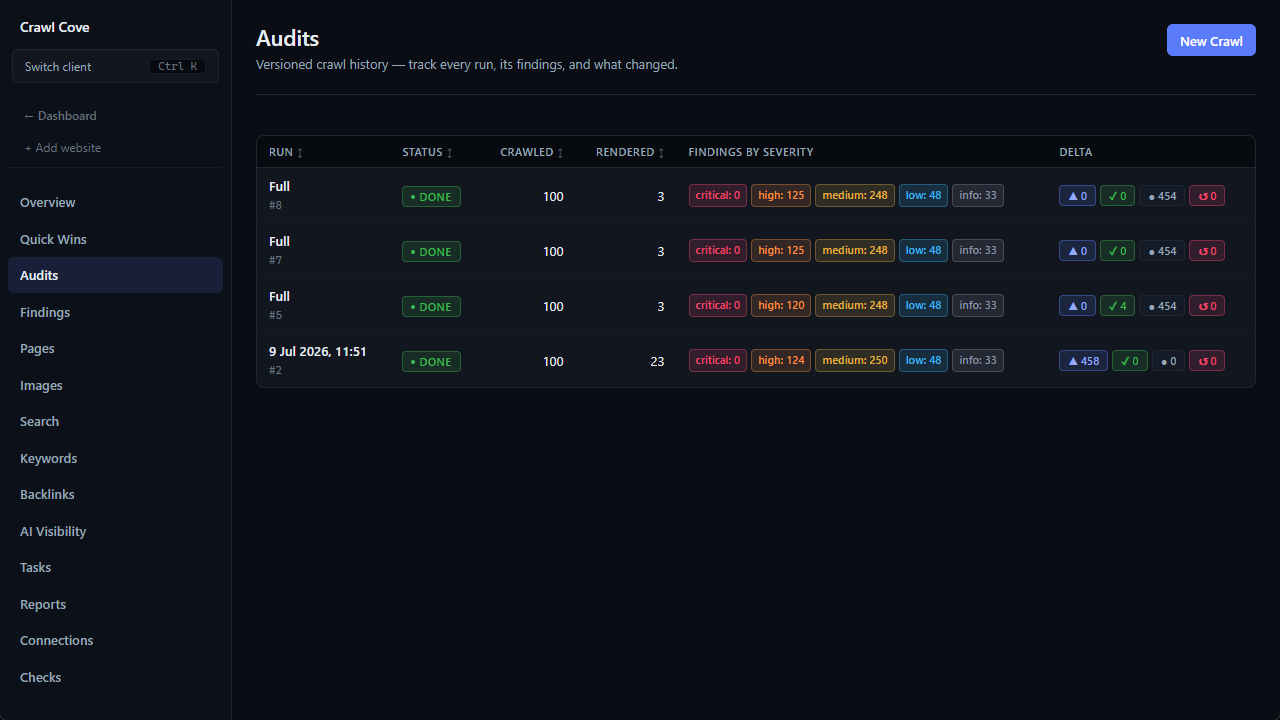
The matching that makes a "fixed" chip trustworthy is the same trap a manual diff falls into if it isn't careful: findings are keyed on the exact check and the exact URL, and because every check is version-pinned, a "fixed" result means that specific problem, on that specific page, was looked for again and genuinely wasn't there, not that the page vanished from the crawl or that the rule quietly changed underneath the comparison. The full mechanics, including how a page that stops being reached is handled differently from one that's actually clean, are in Proving the fix: run history & delta chips.
The workflow this replaces
Re-crawl after a fix ships, open the Audits page, read the delta chips. There's no export to diff, no separate comparison mode to switch on first, and no plan tier that has to include it, because it's the same behaviour on every plan from the first paid audit onward. For a retainer, that turns "the technical work got done" from a claim into a run history a client can look at directly, which is the same proof point presenting an SEO audit to a client and a white-label PDF report both build their case on.
Wrap-up
Comparing two crawls answers a narrower question than a fresh crawl does: not "what's wrong now" but "did that specific thing actually get fixed." Screaming Frog answers it from version 24 onward, with a storage-mode setting and a licence. Sitebulb answers it on its Pro plan. Crawl Cove answers it automatically, on every run, with nothing to switch on first. Whichever tool you use, check whether comparison is something it already does before building a manual export-and-diff habit around one that doesn't.
Start a 14-day trial with no card required, or see how Crawl Cove compares to Screaming Frog in full.
Frequently asked questions
- Do I need to set anything up to compare two Crawl Cove audits?
- No. From the second run of a project onward, every audit is compared to the one before it automatically, and the delta shows on the Audits page as soon as the run finishes. There is no separate "compare" action, export or file to load.
- What exactly counts as a "fixed" finding?
- A finding that was present in the previous run and is absent in the current one, matched on the exact same check and the exact same URL. Because every check is version-pinned, a "fixed" chip cannot quietly change meaning under you when a rule gets stricter, it either found that specific problem on that specific page again or it did not.
- Can I compare crawls that are more than one run apart?
- The delta chips always compare consecutive runs, current against the one immediately before it. To see the change across a longer stretch, look at how the open-issue count has moved across the run history rather than a single pair of runs.
- Does Screaming Frog's free version compare crawls?
- No. Auto Compare Crawls needs database storage mode and a paid Screaming Frog licence; the free tier is capped at 500 URLs and does not save crawls to compare against in the first place.