
Key takeaways
- A crawl-to-crawl comparison answers "what changed since last time"; a per-client issue tracker answers a different question, "what is the status of this specific issue across every month we have worked on this site".
- Consultants report hand-rolling this in spreadsheets or even a plain text file kept alongside the client, because neither Screaming Frog nor Sitebulb ships a persistent per-issue status.
- Screaming Frog's Auto Compare Crawls and Sitebulb's Audit Comparisons both compare two crawls; neither carries an individual issue's status (open, in progress, verified fixed) forward across a longer run history.
- Crawl Cove's Tasks board keeps every finding at a status across the whole life of a client project, and the Awaiting Verification column updates that status from the next crawl automatically.
A crawl tells you what is wrong today. It does not tell you whether the broken canonical you flagged for a client in March is the same one still open in September, or whether it got fixed in June and quietly came back in August. That second question, "what is the status of this specific issue across the life of this client", is a different job from running a crawl, and most of the tooling in this space was not built to answer it.
Why this is a different problem from comparing two crawls
Comparing two crawls answers "what changed since the last run": new findings, fixed findings, findings still open. That is useful, but it is a snapshot pair. Tracking issues over time needs a third thing neither crawl alone has: a persistent record, per issue, that survives across however many crawls a client has been through, so that "fixed in June, back in August" is visible as a single line rather than something you'd have to notice by re-reading old exports.
This is exactly the gap a few practitioners describe hitting in practice. One consultant recommends keeping per-client crawl baselines in a plain text file so that, on a six-month retainer, "every audit is cumulative", which is issue tracking over time, built by hand because nothing in the crawler did it for them (Michael Patrick Cortez, May 2026). Another describes doing crawl comparison "manually in Excel" as "one of the most tedious jobs in technical SEO" (Rich Voller, May 2026). The pattern is consistent: crawlers produce the data, and tracking its status over months is left to whoever runs the audit.
What a manual tracker needs to record
If you are going to hand-roll this in a spreadsheet, it needs at least these columns to actually answer the question:
- URL: the exact page.
- Check: the specific rule that flagged it, not a vague category. "Missing H1" and "duplicate H1" are different problems even if both get called "heading issue".
- First seen: the date it entered the tracker, so you can tell a client how long something has been open.
- Status: open, in progress, or fixed, a single word updated by hand.
- Owner: whoever is meant to be fixing it, since most agencies hand fixes to a developer who isn't in the room for the audit.
- Last verified: the date someone actually re-checked the page, not the date it was marked "fixed".
That last column is the one manual trackers most often skip, and it is the one that matters most. A status field that gets set to "fixed" and never re-checked is a claim, not a verification, and a client who asks "are you sure?" deserves a better answer than "it says fixed in the sheet."
What Screaming Frog and Sitebulb do, and don't
Screaming Frog's Auto Compare Crawls, added in SEO Spider version 24 (May 2026), and Sitebulb's Audit Comparisons both do the same job: diff two crawls and show what changed between them. Checked against both tools' own feature pages this month: neither describes a persistent, per-issue status that carries forward across more than two crawls at a time. A comparison tells you what changed between run four and run five; it does not, on its own, keep a running record of "this exact issue, tracked since run one." That gap is why the consultant above ended up keeping a separate file: the crawler answers "what's different now", and something else has to answer "what's the state of everything we've flagged since we started."
What this looks like automatically in Crawl Cove
Crawl Cove's Tasks board is built around exactly this gap. Every finding can become a task with one click from the evidence drawer, carrying its finding link, evidence snippet and an effort estimate, so a card already knows what's wrong and where without re-investigation. Cards sit in a status (Backlog, In Progress, Awaiting Verification, Needs Rework, Verified Fixed) that persists across the whole life of the client project, not just between two runs.
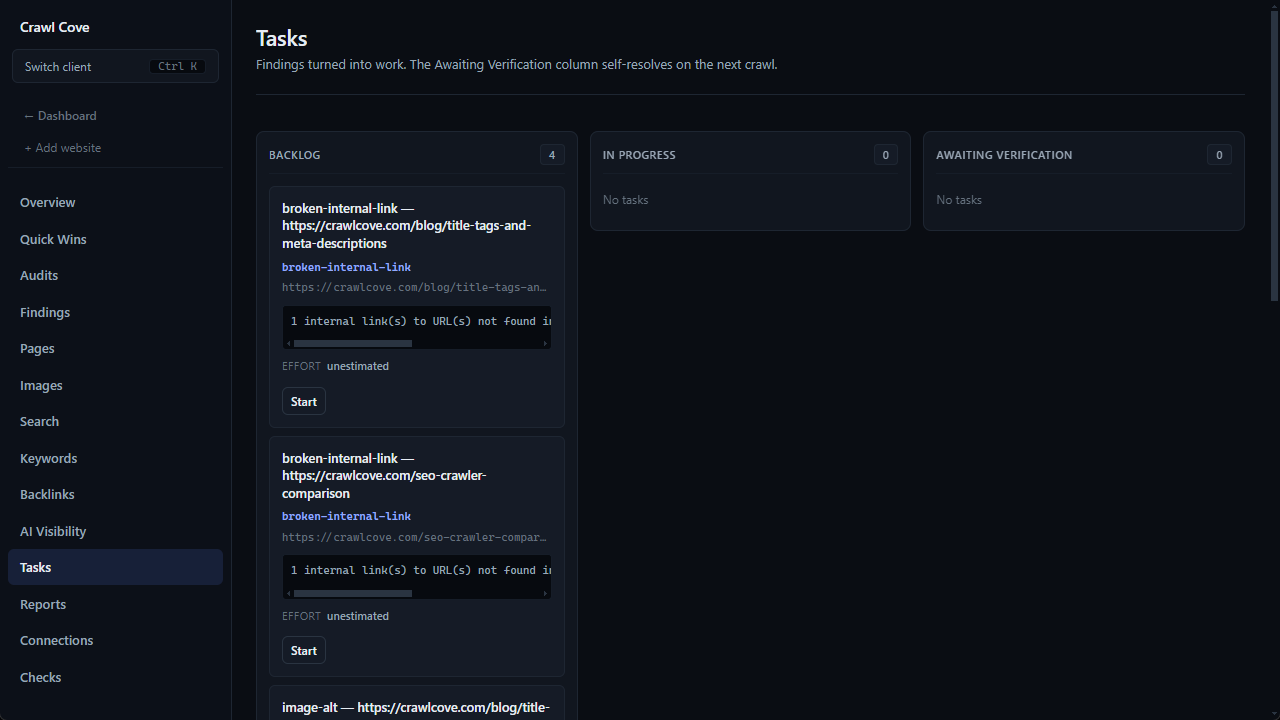
The "last verified" column a manual tracker so often skips is the part Crawl Cove doesn't let you skip: the Awaiting Verification column resolves itself, either passively on the next scheduled crawl or on demand with a Verify button that re-fetches the URL and re-runs the exact check that raised the finding. A card only reaches Verified Fixed because the same rule that flagged the problem ran again and didn't find it, and if a "fixed" issue comes back, the next crawl bounces it straight back to In Progress as Regressed rather than leaving a stale "fixed" label sitting in a spreadsheet nobody re-checked.
At the agency level, the global Tasks page rolls this up across every client at once, so "what's the state of everything we've flagged" is one page rather than one file per client.
Wrap-up
A crawl comparison and a per-client issue tracker answer different questions. Screaming Frog and Sitebulb both answer the first one well; neither ships a persistent answer to the second, which is why the pattern in practice is a hand-rolled file or spreadsheet doing the job the crawler doesn't. If you're building one, the "last verified" column is the part worth protecting most carefully, because it's the one that keeps a status honest. A falling open-issue count across several months of run history is also the case a retainer makes for itself: see how to present an SEO audit to a client for the rest of that argument.
Start a 14-day trial with no card required, or read The Tasks board & the self-verifying workflow for the full mechanics.
Frequently asked questions
- What's the difference between comparing two crawls and tracking issues over time?
- A crawl comparison (see [How to Compare Two SEO Crawls](/blog/how-to-compare-two-seo-crawls)) answers "what changed since the last run", one pair of crawls at a time. Tracking issues over time answers a longer-running question: what is the current status of this specific issue, across however many months this client has been on the books, including whether something marked fixed two months ago has since come back.
- Do Screaming Frog or Sitebulb have a built-in issue tracker?
- Not a persistent one. Both ship crawl comparison (Screaming Frog's Auto Compare Crawls, Sitebulb's Audit Comparisons), which diffs two crawls against each other. Neither carries an individual issue's status forward as its own record across a longer run history the way a task board does; that is why some consultants build one by hand.
- What should a manual SEO issue tracker record?
- At minimum: the URL, the specific check that flagged it, when it was first seen, its current status, who owns the fix, and when it was last verified. Miss the "last verified" column and a tracker silently drifts, since nothing forces a re-check before an issue is marked done.
- Does Crawl Cove's Tasks board do this without extra setup?
- Yes. Every finding can become a task with one click, carrying its evidence and effort estimate, and its status updates from the next crawl or an on-demand Verify, never from someone marking it done by hand. Full mechanics are in [The Tasks board & the self-verifying workflow](/guides/tasks-and-verification).