
Key takeaways
- Start every audit with crawlability and indexing; if search engines cannot reach or index a page, no other fix matters.
- Prioritise by impact times effort, fixing indexing blockers and sitewide template issues before cosmetic problems.
- Always re-crawl after shipping changes to verify the issue count actually dropped and prove the fix worked.
A technical SEO audit checklist is the difference between thinking your site is healthy and knowing it is. This guide walks through a practical, repeatable technical SEO audit: what to inspect, in what order, and how to decide which fixes actually move the needle. It's written for SEOs, agencies and in-house marketers who want a process they can run on any site, not a one-off list to copy and forget.
What a technical SEO audit actually is
A technical SEO audit checks the machinery underneath your content: can search engines crawl your pages, are the right pages indexed, is the architecture sensible, do pages load fast, and is the markup clean? It deliberately ignores what your content says (that's a content audit) and focuses on whether search engines can reach, understand and trust your site, the foundations Google describes in its SEO Starter Guide. Crawl Cove's technical SEO audit tool runs this whole checklist as a single crawl rather than a dozen separate tools.
The point isn't to generate a 400-row spreadsheet of every imperfection. It's to find the issues that genuinely suppress rankings or waste crawl budget, fix them, and prove the fix worked. Everything below feeds that goal.
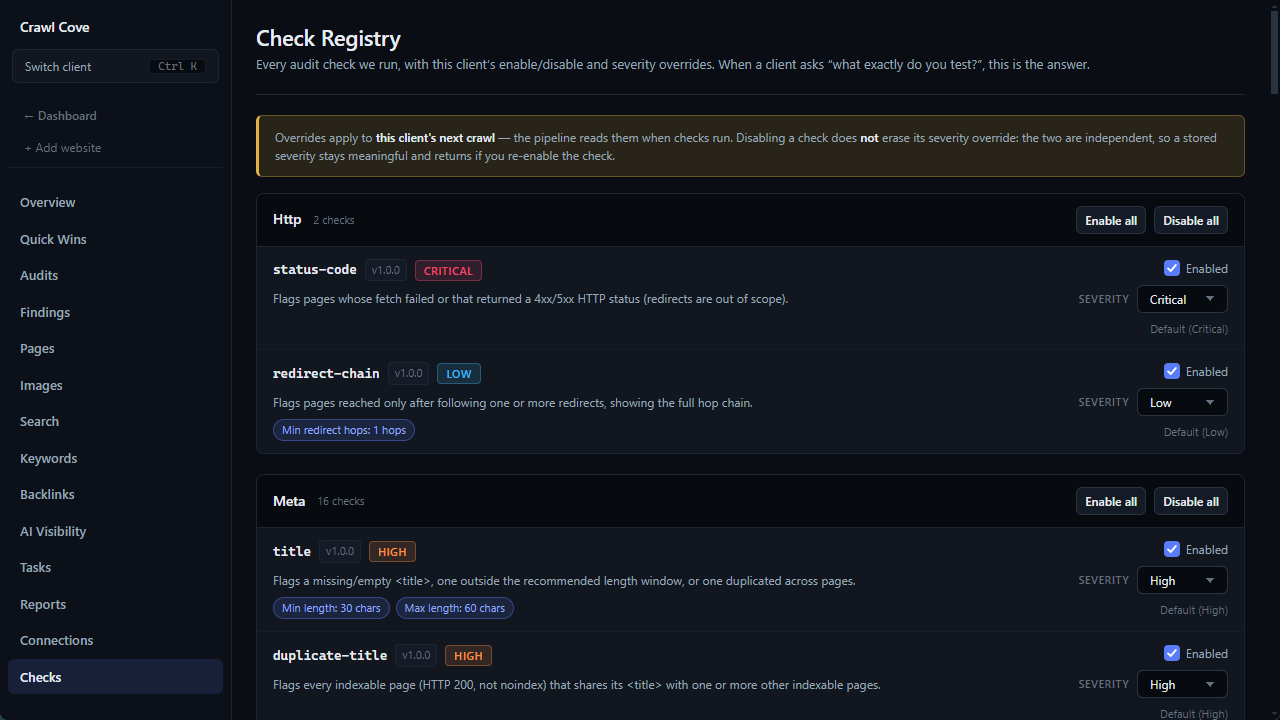
See every check, its default severity and which ones you can tune per client in Tuning the Check Registry.
1. Crawlability and indexability
If a page can't be crawled or is told not to be indexed, nothing else matters. Start here.
- robots.txt: Confirm it isn't blocking important directories. A stray
Disallow: /on staging that gets pushed to production is one of the most common catastrophic mistakes. Remember robots.txt blocks crawling, not indexing. - noindex tags: Check meta robots and the
X-Robots-TagHTTP header. Anoindexon a template can silently drop thousands of pages. Crucially, a page blocked in robots.txt can't be crawled, so Google may never see anoindexon it. Don't combine the two. - XML sitemaps: Every URL in the sitemap should be a canonical, indexable, 200-status page. Remove redirects, 404s and noindexed URLs. Submit sitemaps in Google Search Console and Bing Webmaster Tools. An XML sitemap checker flags the non-200, noindexed and missing URLs for you rather than you opening each one by hand.
- Status codes: Audit the spread of HTTP responses across the site, including redirects: a redirect checker reports every 301, 302 and chain alongside the rest of the crawl.
| Status | Meaning | Action |
|---|---|---|
| 200 | OK | Healthy; confirm it's a page you want indexed |
| 301 | Permanent redirect | Fine in moderation; fix long redirect chains |
| 302 | Temporary redirect | Switch to 301 if the move is permanent |
| 404 | Not found | Redirect if it had value/links; otherwise let it 404 |
| 5xx | Server error | Urgent; fix immediately, these block crawling |
- Crawl depth and orphan pages: Pages buried many clicks from the homepage, or with no internal links at all (orphans), often go uncrawled. An orphan page finder surfaces them so you can link them in.
Tip
Cross-reference your crawl against Google Search Console's Pages report. The crawler shows what can be reached; GSC shows what Google actually indexed. The gap between the two is where your real problems hide. Crawl Cove pulls Search Console data in alongside the crawl so you can compare both views in one place. If you're reconciling click totals while you're in there, read up on anonymised queries first, or the query table will look like it's under-reporting when it isn't.
2. Site architecture and internal linking
A flat, logical structure helps both users and crawlers. Aim to reach any important page within roughly three clicks of the homepage.
- Group related content into clear sections (hub-and-spoke or topic clusters).
- Ensure high-value pages receive more internal links; internal linking is how you distribute authority around your own site. An internal link checker maps click depth and anchor text distribution across the whole site so this stops being a guess.
- Use descriptive anchor text rather than "click here".
- Check for redirect chains and loops in your navigation and breadcrumb links; each hop dilutes signals and slows crawling.
3. On-page basics
These are quick to check at scale and quick to fix.
- Title tags: Unique, descriptive, and not truncated. Flag missing or duplicate titles.
- Meta descriptions: Not a ranking factor, but they influence click-through. Flag missing or duplicate ones on key pages.
- Headings: One clear
<h1>per page and a sensible heading hierarchy. - Images: Alt text present and meaningful; oversized images compressed.
- Canonical tags: Every page should declare a canonical (usually self-referencing).
4. Performance and Core Web Vitals
Speed is both a ranking factor and a conversion factor. Google's Core Web Vitals measure real-world experience:
- Largest Contentful Paint (LCP): Loading. Aim for under 2.5 seconds.
- Interaction to Next Paint (INP): Responsiveness. Aim for under 200 milliseconds.
- Cumulative Layout Shift (CLS): Visual stability. Aim for under 0.1.
Common wins: compress and lazy-load images, serve modern formats (WebP/AVIF), defer non-critical JavaScript, set explicit width/height on media to prevent layout shift, and enable caching plus a CDN. Always validate against field data (real users) in Search Console, not just lab tools, because lab scores can flatter or punish unfairly.
5. Structured data
Schema.org markup helps search engines understand your content and can earn rich results (review stars, FAQs, breadcrumbs, product info). Audit it for:
- Correct type for the page (Article, Product, FAQPage, Organization, etc.).
- Valid syntax: prefer JSON-LD; validate with the Rich Results Test and Schema Markup Validator.
- Accuracy: marked-up content must match what's visible on the page, or you risk a manual action.
Don't over-mark. Add structured data where it earns an eligible rich result, not on every element for its own sake. A structured data checker is the quickest way to see which of your templates carry markup at all before you start validating individual pages.
6. Duplicate content and canonicalisation
Duplicate or near-duplicate URLs split signals and waste crawl budget. A duplicate content checker groups near-identical pages by the template or parameter causing them, rather than leaving you to spot the pattern by eye. Hunt down:
- URL variations: HTTP vs HTTPS, www vs non-www, trailing slashes, and uppercase/lowercase. Pick one canonical version and 301 the rest.
- Parameter URLs: Faceted navigation, session IDs and tracking parameters can spawn endless duplicates. Canonicalise or block them as appropriate.
- Duplicate titles and content: Often a symptom of a deeper templating or pagination issue, not just a copywriting one. See how to fix duplicate titles and descriptions for the right fix behind each cause, since some duplicates are worth chasing and others are best left alone.
Heads up
A noindex and a canonical pointing elsewhere send conflicting instructions on the same URL. Decide whether a page should be consolidated (canonical) or removed from the index (noindex), not both at once.
How to prioritise the fixes
A list of 300 issues helps no one. Prioritise by impact × effort, roughly in this order:
- Indexing blockers: anything stopping important pages from being crawled or indexed (rogue robots.txt rules, accidental noindex, 5xx errors). Fix first, always.
- Sitewide template issues: one bad template can affect thousands of URLs, so a single fix scales massively.
- High-traffic and high-value pages: fix issues on the pages that already earn (or should earn) revenue and rankings before chasing the long tail.
- Core Web Vitals on key templates: measurable, and increasingly tied to user behaviour.
- Everything else: cosmetic duplicates, minor metadata gaps, low-value pages.
This is where a plain-English explanation matters. Knowing a page returns a soft 404 is useless if you don't know why it's a problem or what to do next. Crawl Cove attaches a clear, jargon-free fix to every issue it surfaces (what's wrong, why it matters, and the concrete step to resolve it), so you spend your time fixing rather than decoding error codes. If you're still choosing which crawler to run this checklist with, the SEO crawler comparison table lines up the main options side by side.
Re-crawl and prove the fix worked
An audit isn't finished when you ship the fixes; it's finished when you've verified them. Re-crawl after changes go live and confirm the issue count actually dropped. Versioned audits make this trivial: compare today's crawl against last month's and watch the resolved issues fall off the list. Crawl Cove stores each crawl as a version so you can diff runs over time and demonstrate progress, which is especially useful for agencies reporting to clients. Because it runs locally on your own machine, nothing about your sites is phoned home to a third party.
Wrap-up
Work the checklist top to bottom (crawlability, architecture, on-page, performance, structured data, duplicates), then prioritise ruthlessly by impact and re-crawl to confirm the results. Run it on a schedule (quarterly for most sites, monthly for large or fast-moving ones) and a technical SEO audit stops being a fire drill and becomes routine maintenance. If you want the whole loop (crawl, GSC/Bing/Core Web Vitals in one view, explained fixes and versioned re-checks) in a single private desktop app, that's exactly what Crawl Cove was built for. See features or pricing to get started.
Frequently asked questions
- What is a technical SEO audit?
- It checks the technical machinery of a site (crawlability, indexing, architecture, speed and structured data) to confirm search engines can reach, understand and trust your pages, separate from a content audit.
- How often should I run a technical SEO audit?
- Quarterly works for most sites, while large or fast-moving sites benefit from a monthly check so issues are caught before they compound.
- Which fixes should I tackle first?
- Indexing blockers like rogue robots.txt rules, accidental noindex tags and 5xx errors come first, followed by sitewide template issues that scale across many URLs.