
Key takeaways
- A migration loses rankings almost always for the same reason: a URL that existed before launch has no redirect after it, or the redirect points at the wrong destination.
- Crawl the old site while it is still live. Once it is gone, that link graph and URL list are gone with it, and you are rebuilding the redirect map from memory.
- A desktop crawl reaches staging behind a VPN, an IP allowlist or on localhost the same way it reaches a live site, because it runs from your own machine; a staging site gated purely by username and password is the one case that still needs network-level access added first.
- The job is not finished at launch. A post-launch delta crawl, compared against the pre-launch crawl, is what actually proves every important URL redirects, nothing new 404s and no page was accidentally noindexed.
Most sites that lose rankings in a migration do not lose them to something exotic. They lose them because a URL that used to exist has no redirect pointing away from it, or has one pointing at the wrong page, and nobody found that out until the traffic was already gone. A migration checklist is really just a way of forcing the two crawls that catch this, one before the old site disappears and one after the new one launches, so the gap between them never goes unchecked.
Why migrations are where rankings actually die
A redesign, a replatform, or a domain move all do the same thing to a search engine: every URL it has indexed either needs to keep working or needs to redirect somewhere that does. Nothing about "the new site looks better" or "the new CMS is faster" matters to that signal; only the URL-to-URL mapping does. The two failure modes are almost always one of: a URL that gets no redirect at all (a straight 404 where a page used to rank), or a redirect that exists but points at the wrong target (usually the homepage, which keeps the URL "working" while throwing away the specific relevance the old page had built). Both are invisible until you compare what existed before against what exists after, which is the whole reason this is a two-crawl problem rather than a one-crawl one.
Step 1: crawl the old site while it is still live
Do this before a single file changes. Once the old site is gone, so is the easiest way to get a complete list of every URL it had, the link graph connecting them, and which ones were actually indexable rather than orphaned or already noindexed. A full crawl of the live site is the only reliable source for this; a sitemap alone will miss the orphan pages and old parameter URLs that a sitemap generator never picked up but a search engine may still have indexed years ago.
Step 2: build the redirect map from that crawl
Every URL from step 1 needs a destination on the new site, and "the new page that covers roughly the same topic" beats "the homepage" every time. Where a page genuinely has no equivalent any more, that is a real 404, not a redirect failure, but it should be a decision you made rather than a gap nobody checked. This is the point to also collapse anything already chained: a redirect map built on top of an existing redirect chain just adds another hop, and redirect chains and loops covers why each extra hop is worth flattening rather than leaving in place.
Step 3: crawl staging before launch
Test the redirect map and the new site's own technical health before either is live to the public. A desktop crawler is the right tool for this specifically because it runs from your own machine: it reaches a staging site behind a VPN, an IP allowlist or on localhost exactly the way it reaches a public one. The one gap worth knowing about before you plan around it: Crawl Cove does not yet authenticate through a username-and-password or basic-auth prompt itself, so a staging site gated purely by credentials needs to sit behind a VPN or IP allowlist too before it is reachable. Network-restricted staging works today; a credential-only wall does not yet.
Step 4: launch, then re-crawl the same day
Launch day is when the redirect map goes live, and it is also when a rushed deploy most often ships with the wrong robots.txt, a stray sitewide noindex left over from staging, or a redirect rule that got dropped in the cutover. A same-day crawl of the live site catches these while they are still a same-day fix rather than a week of lost crawling before anyone notices.
Step 5: the post-launch delta crawl that actually proves it worked
This is the step a checklist alone cannot do for you, and the one migrations most often skip because it means running and comparing two crawls rather than one. The question it answers is specific: for every URL that existed before, does it now redirect (or resolve) correctly, and has anything new broken that wasn't broken before?
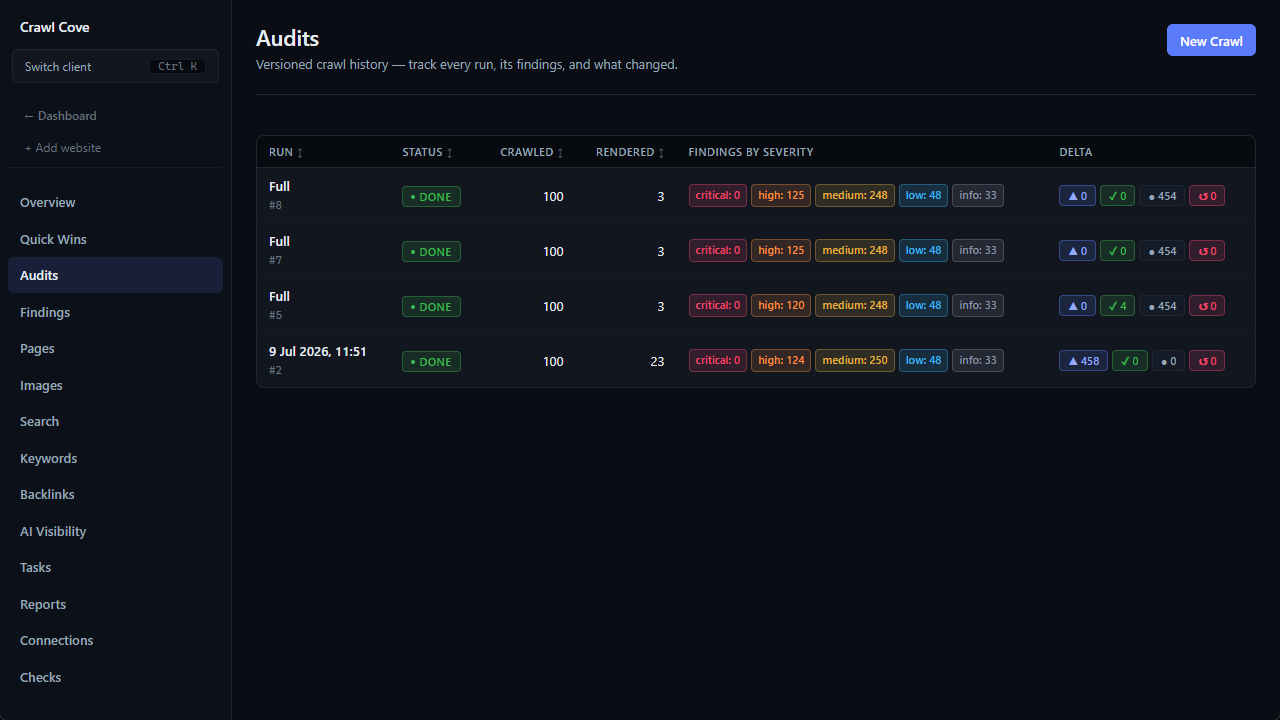
Crawl Cove compares every run to the one before it automatically, so a pre-launch crawl and a post-launch crawl of the same project surface exactly this: new findings that didn't exist before (a fresh 404, a redirect that now chains, a page that lost its indexability), and anything persisting that the migration was supposed to fix. Proving the fix: run history & delta chips covers the matching in full, including how a page that stops being reached is handled differently from one that's genuinely clean, which matters here because a migration is exactly the kind of event that can make a page silently stop being reached at all. A redirect checker is the fastest way to spot-check a single suspect URL's hop path without running the whole crawl again.
The checklist
Copy this into whatever you already use to plan the migration:
- Crawl the live site now, before anything changes, and export the full URL list plus the internal link graph.
- Build the redirect map: every URL from that crawl to its real equivalent on the new site, not a blanket redirect to the homepage.
- Flatten any existing chains you find while mapping, rather than adding a new hop on top of an old one.
- Crawl staging once the new site and the redirect rules are both in place, over a VPN, IP allowlist or localhost if it isn't public yet.
- Check robots.txt and meta robots on staging specifically for a leftover sitewide block or noindex before it ships to production.
- Launch, then crawl the live site again the same day.
- Run the post-launch delta crawl against the pre-launch baseline from step 1, and read the new-findings count before declaring the migration clean.
- Keep old redirects live long-term. A year at minimum, indefinitely for anything with real traffic or inbound links.
Wrap-up
A migration checklist earns its place by forcing the comparison, not by listing more things to remember. Crawl before, map the redirects properly, crawl staging, launch, and crawl again, then let the delta between the first crawl and the last one answer "did this actually work" instead of guessing from a smaller spot-check.
Start a 14-day trial with no card required, or read the technical SEO audit checklist for the same crawl-compare-fix workflow applied outside a migration.
Frequently asked questions
- How long should I keep old redirects live after a migration?
- Indefinitely for anything that ever had meaningful traffic or inbound links, and at minimum a year for everything else. Search engines re-crawl old URLs slowly, and inbound links from other sites do not update themselves, so a redirect removed too early quietly loses whatever signal was still arriving at the old address.
- Can Crawl Cove crawl my staging site before launch?
- Yes, if the login is network-level rather than a credential wall: a VPN, an IP allowlist or a localhost URL all work exactly like a live site, because the crawl runs from your own machine and reaches whatever your machine can reach. Crawl Cove does not yet authenticate through a username-and-password or basic-auth prompt itself, so a staging site gated purely by credentials needs to sit behind a VPN or IP allowlist too before it is reachable.
- What is the single most common migration mistake?
- Redirecting every old URL to the new homepage instead of to its actual equivalent page. It satisfies "nothing 404s" while discarding the specific relevance and ranking signal each old URL had earned for its own topic, which is most of what a redirect is supposed to preserve.
- Do I need a full re-crawl after launch, or just spot-checks?
- A full re-crawl. Spot-checking the URLs you remember mattering will miss exactly the ones you forgot existed, orphaned pages nobody thought to redirect, and old parameter or pagination URLs a manual list never included in the first place.