
Key takeaways
- The download below is a genuine export, not a mockup: a real crawl of crawlcove.com run on 19 September 2026, with every number in this post read straight off it
- A report needs four sections in this order: an executive summary, a prioritised issue list, fix steps, and a note on how the fix gets verified
- An automated finding is not automatically a real problem; a crawler cannot tell a broken page from a page that deliberately rejects GET requests or is deliberately excluded from search, so the report needs to show its working
- Ranking findings by severity alone is a starting point, not a finish line: real client work should weight by actual search reach once that data exists
Most "SEO audit report template" results are either a blank framework with no real data in it, or a vendor's polished example that was clearly built for the screenshot rather than pulled from an actual crawl. Neither tells you what a report looks like once real findings, real URLs and a real site's actual problems are in it.
So here's one that is. The PDF below is a genuine export: Crawl Cove crawled crawlcove.com on 19 September 2026, ran its full check engine against it, and generated this report the same way it would for a paying customer's site. Every number in this post is read straight off that run.
Download the example report (PDF, no sign-up)
What's actually in this example
15 pages crawled (capped there deliberately, more on that below), 33 findings, and a severity spread of 1 critical, 7 high, 16 medium, 5 low and 4 info. That's a real site with a handful of real things worth fixing and a lot of the ordinary medium/low noise any 15-page crawl of any site turns up.
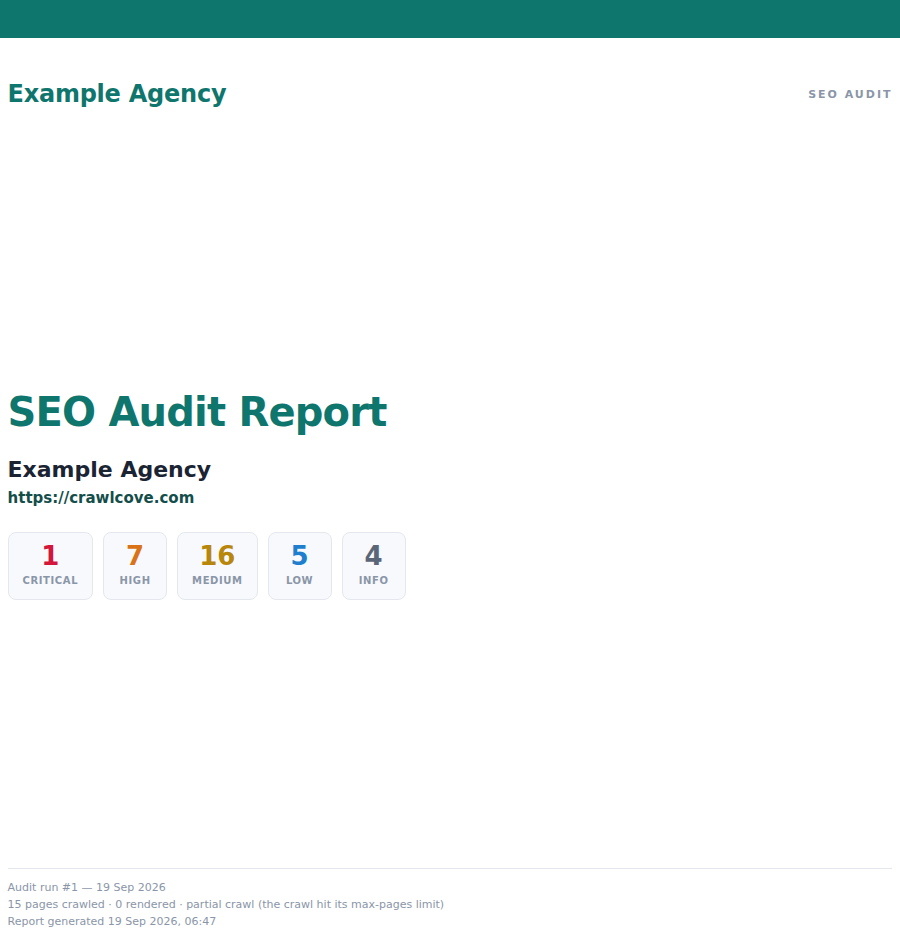
That cover carries the client's own name and colours instead of Crawl Cove's, because the report is meant to go in front of whoever's paying for the audit, not to advertise the tool that produced it. The example above uses a placeholder name; on a real account it's your own agency's.
The four sections a report needs, in order
A crawl produces a pile of findings. A report turns that pile into something someone can act on without reading the raw data first. That takes four sections, always in this order:
1. Executive summary. Two or three sentences, before any findings: what's the overall picture, what matters most, what's the plan. This is the only part most stakeholders read closely, so it has to carry the actual conclusion rather than a description of the process that produced it.
2. A prioritised issue list, not a raw finding dump. This is the part most home-built templates get wrong: they either paste in every finding at whatever order the crawler returned them, or they sort by severity and stop there. Severity is a starting point. It tells you how bad a problem is in isolation, not whether it's actually costing the site anything: a "high" severity issue on a page nobody visits and a "high" severity issue on the homepage are not the same priority, even though they carry the same label. The version below is sorted by severity because this particular run has no search history to weight against yet (it's a fresh scratch audit, not a live account); a report on a site with real Search Console data behind it should weight by actual reach, which is what Crawl Cove's impact score does automatically once an account is connected.
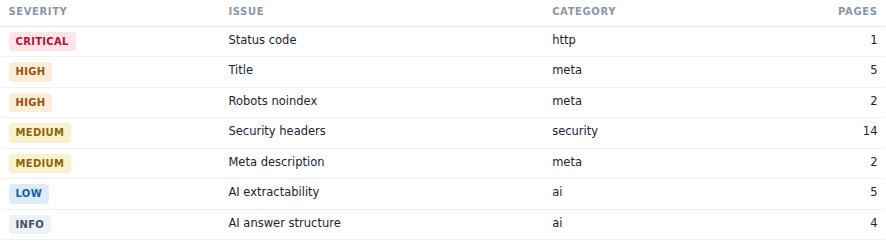
3. Fix steps, written for whoever actually has to make the change, which is rarely the person reading the executive summary. "5 pages have titles under 30 characters" is a fact; "these five page titles are short enough that Google is likely rewriting them in search results, so the words you chose for ranking may not be the words a searcher actually sees" is the same fact aimed at someone deciding whether it's worth twenty minutes. Where the fix is CMS-specific it helps to say so directly rather than leave it generic: a short title is usually the SEO Title field in Yoast SEO or Rank Math on WordPress, the page title in Shopify's own SEO panel under Online Store → Preferences or a product/page's own settings, or a <title> tag straight in the template on anything hand-built. Security headers, this run's most common finding at 14 pages, are usually a .htaccess or server-config change on shared hosting rather than anything in the CMS admin at all: worth flagging as "ask whoever manages hosting" rather than handing it to whoever manages content.
4. How the fix gets verified. A report that ends at the fix list is asking to be trusted on a promise. The stronger version says exactly how the fix will be confirmed: re-crawl on a stated date, and compare the new run to this one. A finding that's genuinely fixed disappears from that comparison; one that isn't, doesn't, regardless of what the status update said in between. Put a date on it in the report itself, not just in a calendar invite.
Read the findings, don't just relay them
A prioritised list is still a list a machine produced, and a crawler cannot always tell a real problem from a page behaving exactly as intended. This example run has two good demonstrations of that, both worth leaving in the report rather than editing out, because explaining them is more convincing than hiding them.
The one critical finding is a 405 on /logout: the crawler sent a GET request and the page refused it. That looks alarming in a severity column. It's also correct: /logout is deliberately built to only accept POST requests, which is the standard defence against a link or an image tag on some other site silently logging a visitor out (or worse, being tricked into it). A crawler can't see intent, only status codes, so it flags the pattern it's built to catch: a page rejecting a request. The report's job is to say what it actually is rather than leave "critical" sitting there unexplained.
The two "high" noindex findings are /login and /register: both are deliberately excluded from search, because ranking a login form is never the goal. Again, correct behaviour, correctly flagged by a check whose actual job is catching the opposite mistake: a page that should rank but was noindexed by accident, which is a real and common way sites lose traffic they never meant to give up.
Neither of these needed fixing. Both needed a sentence of judgement a client-facing report should supply, not leave for whoever reads it to guess at. A report template that can't hold that explanation is a raw export with a cover page, not a report.
Not every finding is a fire
The severity spread on this run, 1 critical, 7 high, 16 medium, 5 low, 4 info, is typical in shape, and the bottom of that list matters for a report template too, because it's where the temptation to pad or to bury shows up. The 5 low findings here are AI-extractability flags: pages where an AI system summarising or answering from the content would have a harder time pulling a clean quote out of it, a newer category of check than the classic technical SEO list but a real one as more search traffic starts arriving via an AI answer rather than a link. The 4 info findings are answer-structure notes in the same vein, not wrong, just short of the clearest possible shape for that kind of extraction.
Neither category belongs anywhere near the top of a prioritised list next to a genuine 405 error, and neither belongs left out of the report either, on the theory that low-severity items aren't worth a client's time. The honest version is what this template does: they're in the full findings table, at the bottom, labelled for what they are. A client can decide they don't matter this quarter. A report that omits them decided that on the client's behalf.
What this doesn't cover
Fifteen pages is a deliberately small sample, not the whole site. crawlcove.com's own host rate-limits requests, and running past that cap in one burst doesn't produce a bigger audit, it produces a wrong one: pages come back rate-limited rather than genuinely broken, and a crawl that reads those as real errors reports fabricated criticals that go away the moment you crawl slower. The example above stayed under that limit on purpose, and its own cover page says so under "partial crawl" rather than presenting 15 pages as the whole picture. A real audit of your own site, run from your own machine with no shared rate limit in the way, covers however many pages you set Max pages to, up to the whole site, on any plan.
The full per-URL data behind every one of the 33 findings above (the exact evidence, not just the summary table) is in a CSV alongside the same audit, which is where that level of detail belongs: with whoever implements the fix, not on the page a client reads first.
Build it once, reuse it every audit
The structure above is the whole template: summary, prioritised list, fix steps, verification date. What makes it worth building once rather than assembling by hand every time is generating it straight from the same data every audit already produces, with your own branding on the cover rather than a screenshot pasted into a slide deck. Crawl Cove's white-label reports do exactly that: the PDF above is one, with a placeholder agency name in place of a real one.
Frequently asked questions
- Is this a real audit, or a mockup built to look like one?
- It's real. The PDF below was generated by actually crawling crawlcove.com and running Crawl Cove's own check engine against it on 19 September 2026, the same code path a customer's audit runs. Nothing in it was hand-edited or staged.
- Why does the report only cover 15 pages?
- crawlcove.com's own host rate-limits requests, so this particular run was capped at 15 pages to stay well inside that limit and avoid the crawl mistaking a rate-limited page for a broken one. The report says so on its own cover, under "partial crawl". A real audit of your own site, with no such limit in the way, covers everything Max pages allows.
- Do I need to use Crawl Cove to use this template?
- No. The structure, the prioritisation logic and the "verify, don't just claim" section all work with findings from any crawler or from a manual review. Export the raw data however you have it and build the same four sections around it.
- Why do some "high" severity findings look like non-issues?
- Because a crawler flags a pattern, not intent. A login page correctly marked noindex and a logout link that correctly rejects GET requests both trip automated checks that exist to catch real mistakes elsewhere. The report template's job is to say so plainly rather than let a client read "high severity" as "broken".