
Key takeaways
- Crawl budget is capacity (how fast Google can crawl) multiplied by demand (how much it wants to)
- Most small and medium sites never need to worry about it, so focus on content and quality instead
- It only matters for large, parameter-heavy, or fast-changing sites where wasted crawl becomes a real tax
- You don't increase crawl budget directly; you remove waste like duplicates, soft 404s, and redirect chains so Google spends it on pages that matter
Crawl budget is the number of URLs Googlebot will crawl on your site in a given period, set by two forces: how much your server can handle and how much Google wants to crawl. For most sites it is a non-issue. For large, parameter-heavy, or fast-changing sites, wasted crawl is a real tax.
This guide explains who genuinely needs to care about crawl budget, what quietly wastes it, and how to make sure Googlebot spends its time on the pages that earn you traffic.
What is crawl budget?
In plain English, crawl budget is the number of URLs Googlebot is willing and able to crawl on your site within a given period. It is not a single dial Google sets for you. It emerges from two separate forces working together.
1. Crawl rate limit (capacity)
This is about how much Google can crawl without hurting your server. Googlebot tries to be a good citizen. If your server responds quickly and returns healthy status codes, Google will crawl more aggressively. If responses slow down or you start throwing 5xx errors, Google backs off to avoid overwhelming you. So your hosting speed and stability directly shape how fast Google is willing to go.
2. Crawl demand (interest)
This is about how much Google wants to crawl. Popular URLs and pages that change often get revisited more frequently. Pages that are stale, unpopular, or rarely updated get crawled less. If Google sees little reason to come back, it simply won't.
As Google's own guide to managing crawl budget for large sites explains, crawl budget is the practical result of these two combined: capacity multiplied by interest. A fast server with boring, never-changing content still won't get crawled much, because demand is low. A constantly-updated site on a slow server gets throttled, because capacity is the bottleneck.
Who actually needs to care?
Here is the part most articles bury, so let's say it up front.
Note
If your site has a few hundred or a few thousand URLs and they're all reasonably healthy, crawl budget is almost certainly not your problem. Google can comfortably crawl a small, well-structured site many times over. Spend your energy on content, links, and page quality instead.
Crawl budget starts to matter when one or more of these is true:
- Large sites: roughly tens of thousands of URLs or more. Big e-commerce catalogues, marketplaces, publishers, and job boards are the classic cases.
- Sites that auto-generate URLs: faceted navigation, search-result pages, and tracking parameters can spawn millions of crawlable combinations from a modest set of real pages.
- Frequently-changing sites: news, large inventories, or anything where freshness matters and you need new or updated pages discovered quickly.
If none of those describe you, you can read the rest of this as background knowledge rather than an urgent to-do list.
What wastes crawl budget
When crawl budget is a concern, the problem is rarely that Google won't crawl enough. It's that Google wastes its crawl on the wrong URLs (junk, duplicates, and dead ends), leaving less for the pages you care about. Here are the usual culprits.
| Crawl-budget waster | Why it hurts | The fix |
|---|---|---|
| Faceted navigation / URL parameters | One product list becomes thousands of filter/sort combinations | Block low-value parameter URLs in robots.txt; use canonical tags; avoid linking to crawlable filter combos |
| Duplicate content | Multiple URLs serve the same page (e.g. ?ref=, session IDs, http/https, www variants) |
Canonicalise to one URL; enforce consistent internal links; 301 the variants |
| Soft 404s | "Empty" pages return 200 OK instead of 404, so Google keeps re-crawling them |
Return a real 404/410 for genuinely missing or empty pages |
| Long redirect chains | Each hop is a wasted request, and chains can dead-end | Point links and redirects straight to the final URL; flatten chains to a single hop |
| Infinite spaces / calendars | "Next month" links forever; endless pagination spawns infinite URLs | Block the pattern in robots.txt; add nofollow or remove the endless links |
| Low-value URLs | Internal search pages, thin tag archives, expired listings | Noindex and/or block from crawling; prune what adds no value |
The common thread: every request Googlebot spends on a duplicate, a redirect hop, or a soft 404 is a request it didn't spend on a page that could rank.
Heads up
Be careful with robots.txt. Blocking a URL stops Google crawling it, but a blocked page can still appear in the index (without a useful snippet) if other pages link to it. If your goal is to keep a page out of the index, use a noindex meta tag instead. Remember Google has to crawl the page to see that tag, so don't block it at the same time.
How to optimise crawl budget
You don't "increase" crawl budget directly. You make Google's existing budget go further by removing waste and pointing it at the right pages.
- Tidy your
robots.txt. Disallow crawl traps: faceted parameter URLs, internal search results, infinite calendars. This is the single biggest lever on most large sites. - Strengthen internal linking. Your important pages should be a few clicks from the homepage and linked from relevant content. Googlebot follows links, so good internal structure naturally guides crawl toward what matters. Our guide to internal linking for SEO covers how to find the orphaned and over-deep pages this leaves behind.
- Keep XML sitemaps clean. List only canonical, indexable,
200 OKURLs, and keeplastmoddates honest so Google can prioritise what changed. An XML sitemap checker flags the non-200 and noindexed URLs still sitting in yours. - Fix redirects and duplicates. Flatten redirect chains to one hop with a redirect checker, consolidate duplicate URLs onto a single canonical with a duplicate content checker, and make sure internal links point at final destinations, not at redirects. If chains are your main source of waste, we cover finding and flattening them in redirect chains and loops.
- Prune low-value pages. Fewer, stronger URLs are easier to crawl and tend to perform better anyway.
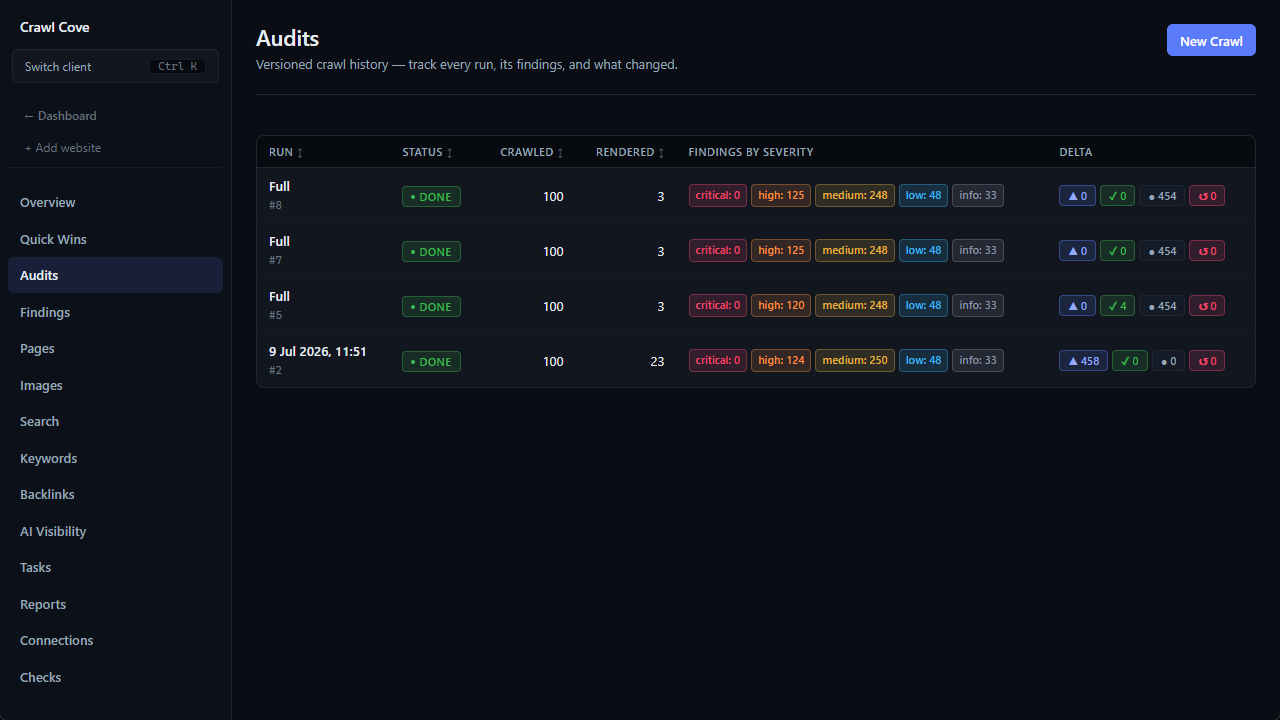
This is exactly the kind of cleanup Crawl Cove is built for. It crawls your whole site locally and surfaces the redirect chains, duplicate and near-duplicate URLs, orphaned and over-deep pages, and sitemap gaps that quietly drain crawl budget. For each issue it gives you a plain-English explanation of why it matters and how to fix it, rather than just a raw error code. Because audits are versioned, you can crawl, fix, re-crawl, and confirm the waste is actually gone.
How to see crawl activity
Before you optimise anything, look at what Google is actually doing.
- Google Search Console → Crawl Stats report. This shows total crawl requests over time, broken down by response code, file type, purpose (discovery vs. refresh), and Googlebot type. Spikes in
404s, redirects, or "Other" file types are red flags worth investigating. - Server log files. The ground truth. Your logs show every real Googlebot request: which URLs it hit, how often, and what status they returned. Logs reveal crawl waste that Search Console summaries can hide, such as Google hammering thousands of parameter URLs you forgot existed. A log file analyser parses those raw logs for you and shows exactly where Googlebot is spending its crawl, so you can spot the URLs eating budget that should be going to pages that rank.
Pair that real-world crawl data with a full site crawl from Crawl Cove, compared with Screaming Frog, and you can line up "what Google is crawling" against "what's actually on the site." That's how you find the gap between effort spent and value returned. And because Crawl Cove runs locally on your own machine, your client's crawl data is never uploaded to us; the only things that leave are the requests made by an integration you switch on yourself, on your own key.
Wrap-up
Crawl budget is simply the result of how much Google can crawl your site (capacity) and how much it wants to (demand). For most small and medium sites, it's a non-issue, so focus on content and quality instead. But if you run a large, parameter-heavy, or fast-changing site, wasted crawl is a real tax on your visibility.
The practical playbook is short: see what Google is actually crawling (Crawl Stats and server logs), kill the waste (parameters, duplicates, soft 404s, redirect chains, infinite spaces), and point your internal links and sitemaps at the pages that matter. Do that, and Googlebot spends its time where it counts.
Frequently asked questions
- Does my small site need to worry about crawl budget?
- Almost certainly not. Google can comfortably crawl a site with a few thousand healthy URLs many times over, so your effort is better spent on content, links, and page quality.
- When does crawl budget actually become a problem?
- When you run a large site (tens of thousands of URLs), auto-generate URLs through faceted navigation or parameters, or publish frequently and need new pages discovered quickly.
- Can I just increase my crawl budget?
- Not directly. You make Google's existing budget go further by removing crawl waste and pointing internal links and sitemaps at your important, canonical pages.