
An audit is one timestamped pass of Crawl Cove's own crawler over a client's site. It produces a list of crawled pages and a list of findings — every one of them from a deterministic, coded check, never an AI guess. Because Crawl Cove brings its own crawler, there's no third-party crawl quota to burn and nothing metered to top up.
Note
What you'll need: a client already added (see Adding your first client). Optional: a Chromium binary for the Tier-2 rendered pass (covered below). ~10 minutes for a first crawl.
Start a crawl
Open the client's Audits (Crawl Runs) page and click New Crawl. Every field has a hover tooltip, and every default is sensible out of the box — you can usually just click start. The options and their real defaults:
| Option | Default | Range | What it does |
|---|---|---|---|
| Seed URLs | the site's primary domain | — | Where the crawl starts. |
| Max pages | 200 | 1–100,000 | Hard cap on pages fetched. |
| Max depth | 5 | 0–100 | Max link-clicks from the seed. |
| Concurrency | 4 | 1–16 | Simultaneous in-flight fetches. |
| Politeness delay | 300 ms | 0–60,000 ms | Minimum gap between request starts. |
| Render-sample % | 20 | 0–100 | Fraction of pages sent through the Tier-2 rendered pass. |
| User-agent | CrawlCove-Crawler |
— | Auto-switches to a browser UA if the site blocks the default. |
| Exclude images | on | on/off | Skips images and media files. |
| Include / exclude patterns | none | — | Optional path-substring filters to scope the crawl. |
| Staging auth | — | — | Basic-auth/cookie for pre-launch sites. (Labelled "coming soon" in the current build.) |
| Schedule | none | — | Recur the crawl (runs while the app is open). |
These defaults are set agency-wide in Settings and can be overridden per crawl right on this form.
Polite and safe by default
You can point Crawl Cove at a live client site without worry. The crawler loads
robots.txt first and never fetches a disallowed URL. It discovers pages from
sitemaps and links, retries transient errors with backoff (so a momentarily
throttled page isn't wrongly flagged as broken), and follows redirect chains so it
can capture them. The default settings — concurrency 4 with a 300 ms gap — work out
to roughly a 3.3 requests/second ceiling. For the full behaviour reference, see
How the crawler behaves.
Watch it work
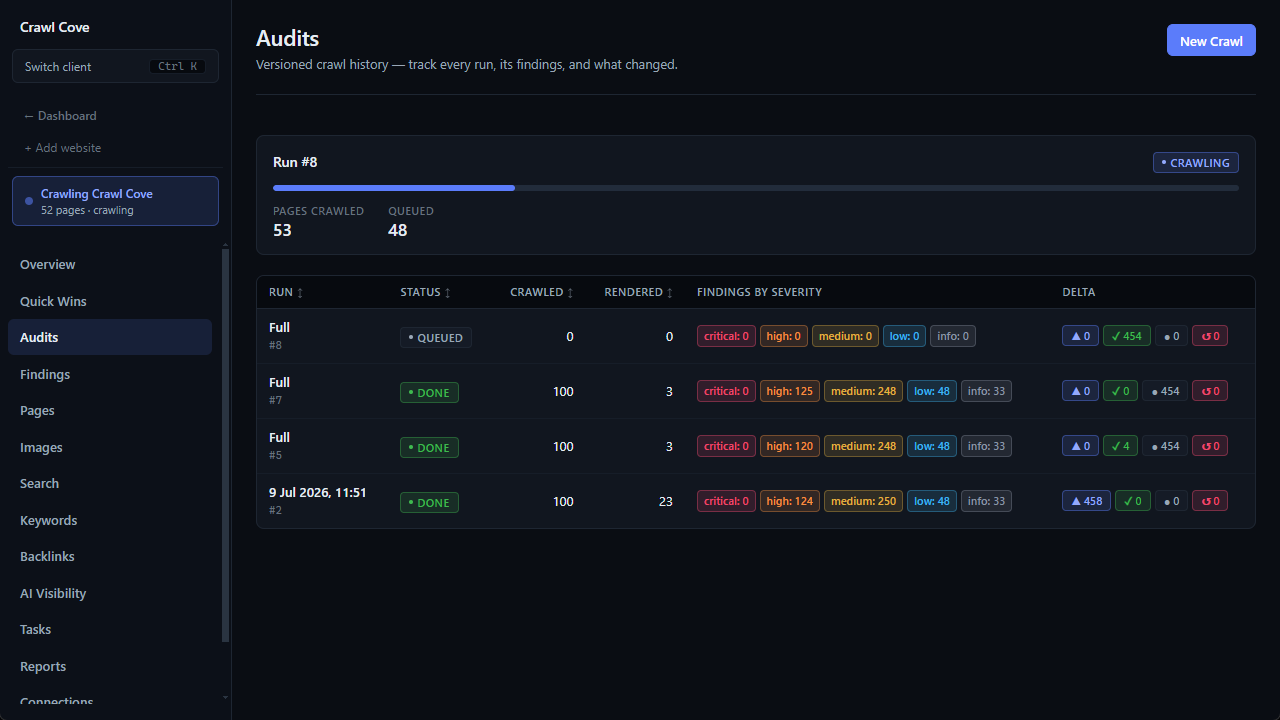
A run moves through clear statuses, with live page counts as it goes:
queued → crawling → rendering → done, then the deterministic checks run: analyzing → analyzed.
A global crawl indicator in the app shell animates whenever any crawl is in flight, on any client — so you always know work is happening.
Heads up
The rendering step needs a Chromium binary. Without it, Tier-2 rendering is
skipped and you'll see a visible badge: "Tier-2 rendering skipped — run
npx playwright install chromium." The crawl still completes fully with Tier-1
static-HTML data; nothing crashes. Install the binary once per machine to catch
JavaScript-injected content and schema:
npx playwright install chromium
This same install also powers the on-demand Lighthouse lab on the Pages inspector.
Read the result
When the run finishes, each row in the history shows its status, pages crawled/rendered, and findings broken out by severity. From the second run onward, it also shows delta chips against the previous run — the feature that lets you prove a fix actually worked. That's a guide of its own: Proving the fix.
Next steps
- Proving the fix — turn a one-off crawl into a versioned history.
- Mastering the Findings Explorer — work the issues the crawl surfaced.
- How the crawler behaves — robots, politeness, retries, and render sampling in depth.