
Rank trackers are one of the easiest line items to cut from your tooling bill. Crawl Cove's Keywords view turns Search Console's average position into a proper longitudinal rank story (deltas, trends, sparklines) without a single paid rank tracker in the stack. The data is first-party, deterministic, and already on your machine.
Note
What you'll need: Google Search Console connected for this client. Rank tracking is built entirely on synced GSC data, so set that up first with Connecting Google Search Console if you haven't.
The tracked-keyword table
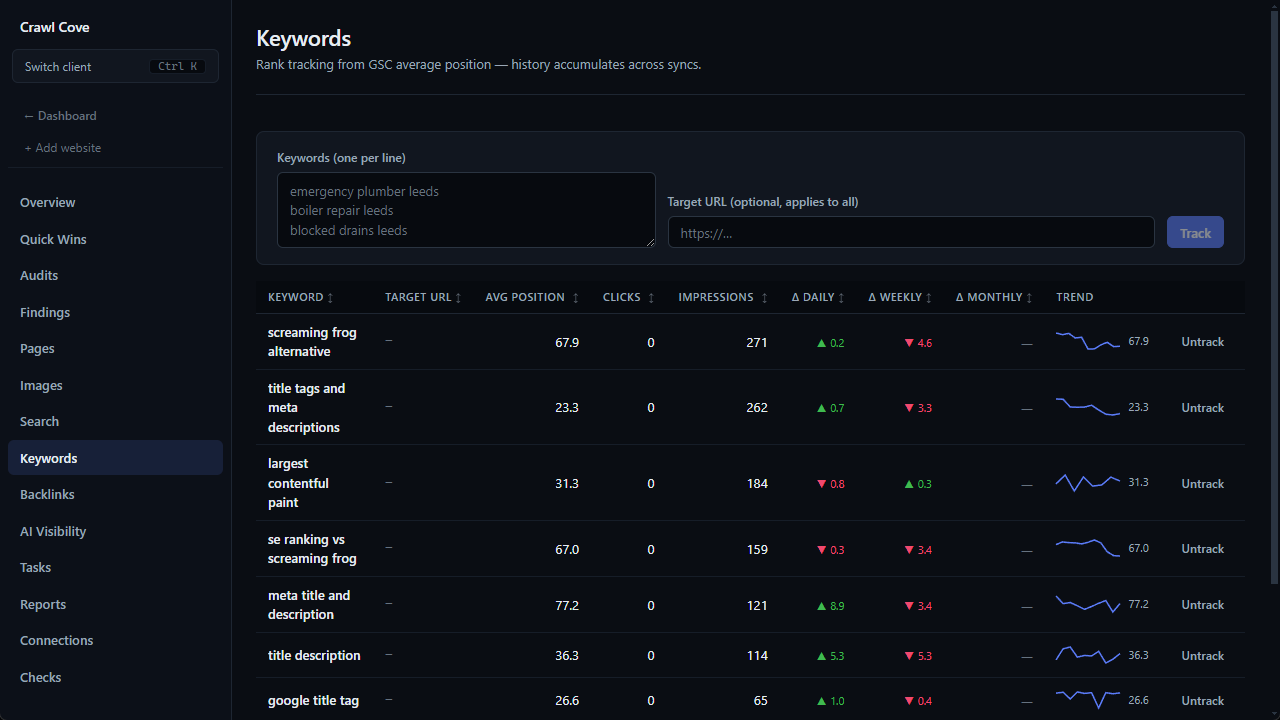
The core of the page is a table of the keywords you're tracking. Each row shows:
- The keyword, and an optional target URL.
- Current average position, plus clicks and impressions.
- Daily, weekly, and monthly position deltas, so you see direction at a glance, not just a single number.
- A trend sparkline of recent movement.
Adding keywords (two ways)
From the Keywords view. The add box takes one keyword per line, so a single term and a pasted list of fifty use the same field. An optional target URL applies to every keyword in the batch. Duplicates are dropped case-insensitively, keeping the first spelling you typed, and blank lines are ignored, so you can paste a messy list without cleaning it first. Tracking is idempotent: a keyword you already track resolves to its existing row rather than a duplicate.
Straight from Search. Promote any query from the Search page's queries table with "Track this keyword", so the striking-distance terms you decide to work on become tracked rankings in one click. The content-gap discovery list on the same page offers the same Track action. See Search performance for where those lists come from.
Instant data via backfill
Normally a newly tracked keyword would show "No GSC data yet" until the next sync. Crawl Cove improves on that: it backfills each new keyword from already-synced GSC data on the spot. When you track a batch, the confirmation tells you how many already have a rank: "Now tracking 5 keywords" followed by how many came back with live data, and a note that the rest fill in as Search Console syncs run. If Search Console is not connected or needs reconnecting, it says that instead, because no sync is coming until you fix it on the Connections page.
Tip
Because backfill reads your existing 90-day window, the more history a client has accumulated, the more of your newly tracked keywords show live data the instant you add them.
Reading a single keyword's history
Click any row to open a detail drawer with the full daily rank-trend chart for that keyword, one point per day with the clicks and impressions behind it. A day with no impressions is skipped rather than drawn as a zero. This is the view you put in front of a client to show a term climbing from position 14 to position 6 over a quarter: a clean, defensible story drawn straight from their own Search Console data.
Checking how hard a keyword is
The same drawer carries a Difficulty panel. Press Check difficulty and Crawl Cove fetches the top ten organic results for the keyword from your own connection, looks up each ranking domain's authority through the free Open PageRank API, and scores the result from 0 to 100 as a position-weighted average of who ranks today. Four bands: Easy up to 30, Medium to 55, Hard to 75, Very hard above that. Your own domain is highlighted in the list when it appears.
Two honesty rules apply. If fewer than five of the ten domains have authority data, the score is withheld and only the result list is shown, rather than scoring from a sliver. And the score describes the strength of the sites on page one, which is the decision you are making (chase this term or skip it); it is not a prediction of ranking probability. The check needs an Open PageRank key, which is free; the panel points you to Settings if one is missing. See Checking backlinks for free for the same key used on the Backlinks page.
Untracking is safe
Removing a keyword is a soft-delete. The app asks for confirmation first, and the stored rank history is kept, so you will not lose accumulated history by mis-clicking. Track the same keyword again later and its chart is still there.
How rank is calculated (and why it's honest)
Rank here is GSC's impression-weighted average position (lower is better), derived deterministically. It is never a finding, and it is never produced by the LLM. The AI layer in Crawl Cove explains and summarises, but it has no hand in your numbers.
Two consequences worth understanding:
- History accumulates across syncs. Each sync adds to the rank trend, so the picture gets richer the longer a client is connected.
- It's honest about gaps. A freshly tracked keyword with no matching data reads "No GSC data yet" rather than showing a fabricated zero. When you present a chart to a client, every point on it is real.
That honesty is the whole point. A scraped rank tool gives you a confident number you can't fully trust; Crawl Cove gives you Google's own measurement, computed the same way every time, with the gaps labelled rather than papered over.
Next
- Search Performance: declining pages & striking-distance keywords: where to find the queries worth tracking in the first place.
- White-label reports: turn tracked rank deltas into a branded keyword-movement report for the client.
- Why did my Search Console impressions drop?: read this before blaming a position change for a traffic dip.