
Once you're running more than a couple of clients, the daily question stops being "what's wrong with this site?" and becomes "where do I spend the next thirty minutes?" Crawl Cove answers that with three connected pieces: a Settings page that configures the machine once, a Calendar + scheduler that makes the retainer rhythm run itself while the app is open, and an Agency Dashboard that triages the whole portfolio at a glance.
Settings: configure the machine once
The agency Settings page holds per-machine configuration that applies across every client:
- Agency default branding: your own logo and colours, the fallback when a client doesn't have its own.
- Data storage path with backup/export. The live database lives at
<userData>/crawlcove.db; encrypted secrets sit separately under<userData>/secrets/. A one-click Back up database button writes a consistent snapshot of the whole SQLite file to a location you choose. It flushes the write-ahead log first, so the copy is safe to take while the app is running. - Crawl defaults: concurrency, politeness delay, and user-agent string. These actually reach the crawler; set them once and every new crawl inherits them (still overridable per crawl).
- API keys: CrUX, Bing, and Open PageRank, all encrypted via safeStorage.
- LLM backend selector: see Configuring the optional LLM backend.
Tip
The Back up database button is your whole agency in one file: every client, every crawl run, every finding. It's safe to run mid-session. There's deeper detail on what's in (and pointedly not in) a backup in Exporting your data; secrets never leave safeStorage, so they're excluded by design.
Calendar & the scheduler
The Calendar is colour-coded per client and holds scheduled crawls, report deadlines, client calls, and content due dates. It's the retainer rhythm made visible: monthly crawl → findings review → report → call.
- Natural-language quick add. Type something like a plain-English event and the date is resolved deterministically (by chrono-node); the model only handles the title and intent, and the feature degrades gracefully if the LLM is off. The date is never an AI guess.
- The scheduler runs due crawls while the app is open. A main-process scheduler fires the crawls you've scheduled. Set a schedule in the New Crawl config when you run an audit. It runs while Crawl Cove is open rather than as a hidden background service, which keeps the local-first model honest: no daemon quietly touching client sites when you're not there.
The Agency Dashboard: 30-second triage
The Agency Dashboard is the global landing page: a thirty-second read on the whole book of business before you decide where the day goes.
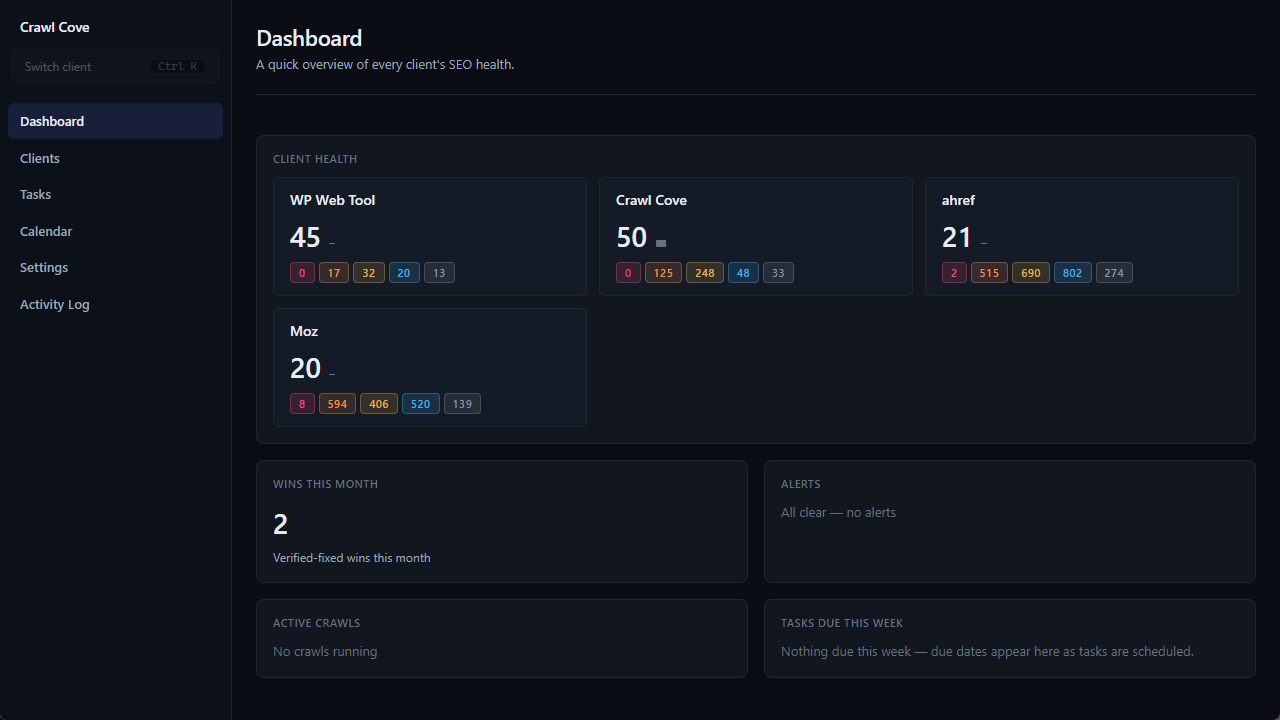
It pulls together:
- A client health-score grid: one card per client, with a score and a trend arrow.
- An alert feed: new critical findings since yesterday, GSC traffic drops beyond a threshold, expired OAuth tokens, and lost high-value backlinks.
- Crawls currently running, with live page counts.
- Tasks due this week, across all clients.
- A "wins this month" counter: the number of verified-fixed findings, so the proof-of-value is sitting on your home screen.
The point is triage: glance, spot the two clients that need you today, ignore the twelve that are fine.
No silent failures: Connections health & the Activity Log
A multi-client tool is only trustworthy if you can tell when an integration breaks, so silent failure is designed out.
- Connections (per client) shows each integration's health: GSC OAuth status (token valid? last sync?), the Bing WMT key, GSC Links CSV import status, last-sync timestamps, recent sync errors, and Reconnect / Test buttons. When any chart in the app is empty, this page tells you why in one look.
- The Activity Log (agency level) is a chronological, filterable record of crawl events, tool calls with their actual arguments, LLM requests and responses, and errors with context, filterable by client and subsystem. When something misbehaves, the evidence is already on screen. (Secrets, query text, and robots bodies are never logged.)
Note
An expired token or a failed sync surfaces as a visible alert and a red Connections status, never as a quietly empty chart you discover a week later in front of a client.
Next
- Exporting your data: CSV & database backup has the full detail on the one-click database backup and the CSV exports.
- A tour of the interface shows how the agency level and the per-client workspace fit together.