
Off-page analysis is where most SEO stacks start charging four figures a year. Crawl Cove keeps it subscription-free by pulling a client's link profile from three free sources and computing new-vs-lost movement deterministically across syncs. Nothing is guessed, nothing is invented.
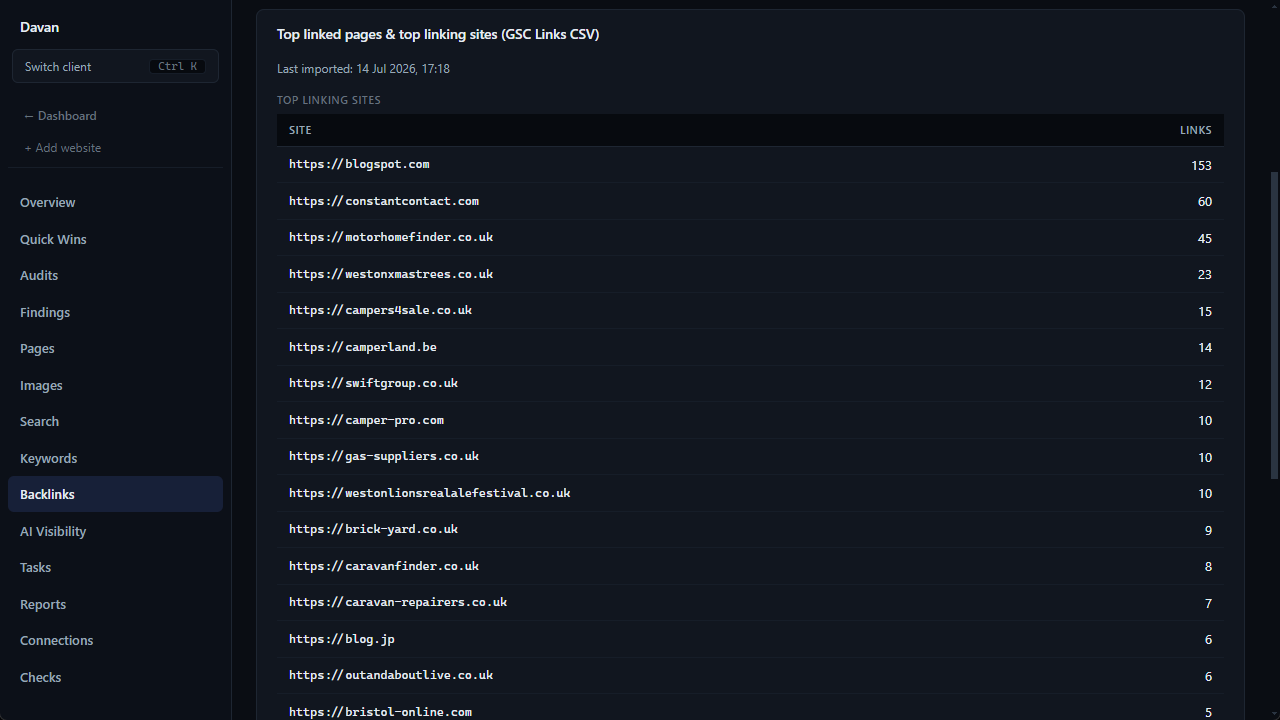
The Backlinks page combines all three sources in one view: linking domains from Bing Webmaster Tools, top linking sites and linked pages imported from Search Console, and an optional Open PageRank authority score per domain.
1. Bing Webmaster Tools: new & lost linking domains
This source needs a Bing API key per client and that client's site verified in the Bing Webmaster Tools account the key belongs to. Clients often have their own Bing accounts, so Crawl Cove stores one key per client rather than one for the agency.
Note
What you'll need: a Bing Webmaster Tools account, the client's site added and verified there, and that account's Bing API key pasted into Crawl Cove on the client's Connections page. ~10 minutes the first time; a couple of minutes per additional client, since each carries its own key.
Exact steps:
- Sign in at bing.com/webmasters.
- Add the client's site. You can import sites straight from Google Search Console to save typing.
- Verify ownership by any of the offered methods: an XML file upload, a
<meta>tag, or a CNAME DNS record. - In Bing WMT go to Settings → API access → generate an API key.
- In Crawl Cove open Settings and paste the Bing API key (it is stored encrypted via safeStorage, so the renderer never sees the raw value).
- Open the client's Connections page → Connect Bing with the verified site URL → Sync to import linking domains.
New-vs-lost is computed deterministically across syncs using first_seen /
last_seen timestamps. Nothing is ever deleted, so the history of who linked and
when stays intact. Until both the key and the verification exist, the panel says so
honestly: "Bing API key not set" or "Site not verified in Bing."
2. GSC Links report CSV import (no credential)
Google doesn't expose the Search Console Links report through any API, so Crawl Cove imports the CSV directly. This needs no extra credential, just the export.
- In Google Search Console, open the property → Links → Export (you get a ZIP of CSV files).
- In Crawl Cove, go to the client's Backlinks page → Import GSC Links CSV → choose Top linking sites or Top linked pages → pick the matching CSV → import. Import one file at a time.
- The page shows the two tables plus a "Last imported: <date>" stamp. Malformed, empty, or oversized files are rejected with an honest inline error rather than silently failing.
3. Open PageRank: optional authority score
Open PageRank is a free domain-authority proxy you can layer onto the linking-domains tables.
- Register free at domcop.com/openpagerank and request an API key.
- In Crawl Cove open Settings and paste the Open PageRank key (encrypted).
- Scores populate the linking-domains tables after the next Bing sync, and each domain's score caches for 24 hours so you're not re-hitting the API.
Tip
Add the Open PageRank key once at the agency level and every client's linking domains gain an authority column automatically. It's a quick way to separate a handful of high-authority referrers from a long tail of low-value ones.
The honest limitation, and why it doesn't matter
Note
Free sources cover your client's link profile, not competitors'. True competitor link-gap analysis is the one thing that genuinely needs a paid backlink index. Rather than pretend otherwise, Crawl Cove leans its differentiation on AI Visibility and GSC-based impact scoring: measurements most local agencies can't put in front of a client at all.
That trade is deliberate. A backlink count is a vanity metric most clients can't act on; a prioritised, impact-ranked fix list and a month-over-month AI-visibility chart are things you can charge for and prove. The Backlinks page gives you the client's own link story for free, and the product spends its edge where free data still wins.
Next
- Measuring AI Visibility: the differentiator that replaces a competitor backlink index.
- Prioritising with impact score: turn findings into a do-these-first list using real GSC traffic.